- [1. Reference](#1-reference)
- [1.1. Next.js Authentication Made Easy with Microsoft Entra ID](#11-nextjs-authentication-made-easy-with-microsoft-entra-id)
- [1.2. Next.js 16 Middleware DEPRECATED - Authentication In Proxy Or Data Access Layer?](#12-nextjs-16-middleware-deprecated---authentication-in-proxy-or-data-access-layer)
- [1.3. Overview of user consent and how to manage it in Microsoft Entra | Microsoft](#13-overview-of-user-consent-and-how-to-manage-it-in-microsoft-entra--microsoft)
- [1.4. Add Tailwind CSS to an Existing Next js Project](#14-add-tailwind-css-to-an-existing-next-js-project)
- [1.5. How to style Material UI component with Tailwindcss in React project](#15-how-to-style-material-ui-component-with-tailwindcss-in-react-project)
- [1.6. How to Use Prisma 7 in Next.js](#16-how-to-use-prisma-7-in-nextjs)
- [2. Project Structure](#2-project-structure)
- [3. App Registrations](#3-app-registrations)
- [3.1. Permissions Needed](#31-permissions-needed)
- [4. Steps](#4-steps)
- [4.1. create nextjs app](#41-create-nextjs-app)
- [4.2. Create .env file](#42-create-env-file)
- [4.3. Configure Git](#43-configure-git)
- [4.4. Test nextjs](#44-test-nextjs)
- [4.5. Check Authentication](#45-check-authentication)
- [4.6. Install NextAuth.js v5](#46-install-nextauthjs-v5)
- [5. .env files](#5-env-files)
- [5.1. .env.local](#51-envlocal)
- [5.2. .env](#52-env)
- [6. Prisma Install](#6-prisma-install)
- [6.1. The CLI is for development tasks like migrations](#61-the-cli-is-for-development-tasks-like-migrations)
- [6.2. Create the prisma folder](#62-create-the-prisma-folder)
- [7. Run this whenever you change your schema.prisma file](#7-run-this-whenever-you-change-your-schemaprisma-file)
- [7.1. Pro-Tip: Update your package.json](#71-pro-tip-update-your-packagejson)
- [8. Where we are up to 8/1/2026](#8-where-we-are-up-to-812026)
- [9. Testing Creating And Uploading Folders and Files](#9-testing-creating-and-uploading-folders-and-files)
- [10. 📚 WebCalibre Development Notes 17/1/2026](#10--webcalibre-development-notes-1712026)
- [10.1. 🚀 Project Overview](#101--project-overview)
- [10.2. 🛠 Critical Technical Learnings](#102--critical-technical-learnings)
- [10.2.1. MUI X v8 DataGrid Toolbar Fix](#1021-mui-x-v8-datagrid-toolbar-fix)
- [10.2.2. Global "Hidden" Search](#1022-global-hidden-search)
- [10.2.3. Server-Side Extraction](#1023-server-side-extraction)
- [10.3. 📑 Essential Commands](#103--essential-commands)
- [10.4. 📅 Future Roadmap](#104--future-roadmap)
- [10.4.1. Phase 1: Metadata Utility (In Progress)](#1041-phase-1-metadata-utility-in-progress)
- [10.4.2. Phase 2: UI Enhancements](#1042-phase-2-ui-enhancements)
- [10.5. 💡 Reminders](#105--reminders)
- [](#)
- [Dump of metadata for an image](#dump-of-metadata-for-an-image)
- [Where the code should exist](#where-the-code-should-exist)
- [1. Where to put the fetch call?](#1-where-to-put-the-fetch-call)
- [2. Where to put `getMetadataFromJson`?](#2-where-to-put-getmetadatafromjson)
- [🏗️ How it looks all together](#️-how-it-looks-all-together)
- [image metadata](#image-metadata)
- [pdf metadata](#pdf-metadata)
- [useful](#useful)
# 1. Reference
## 1.1. Next.js Authentication Made Easy with Microsoft Entra ID
[Next.js Authentication Made Easy with Microsoft Entra ID](https://www.youtube.com/watch?v=tNLrMKZ-xmc&t=5s)
## 1.2. Next.js 16 Middleware DEPRECATED - Authentication In Proxy Or Data Access Layer?
[Next.js 16 Middleware DEPRECATED - Authentication In Proxy Or Data Access Layer?](https://www.youtube.com/watch?v=zNgCFXZLoRk)
## 1.3. Overview of user consent and how to manage it in Microsoft Entra | Microsoft
[Overview of user consent and how to manage it in Microsoft Entra | Microsoft](https://www.youtube.com/watch?v=u6PyQkNi7xk)
## 1.4. Add Tailwind CSS to an Existing Next js Project
[Add Tailwind CSS to an Existing Next js Project](https://www.youtube.com/watch?v=vRqTNuX46PY)
## 1.5. How to style Material UI component with Tailwindcss in React project
[How to style Material UI component with Tailwindcss in React project](https://www.youtube.com/watch?v=QQIfuMlA6TI)
## 1.6. How to Use Prisma 7 in Next.js
[How to Use Prisma 7 in Next.js](https://www.youtube.com/watch?v=Ndhx_rNkoUw)
# 2. Project Structure
The following is the desire structure
```txt
web-calibre/
├── src/
│ ├── app/ # All Routes (Pages & APIs)
│ │ ├── api/ # API ROUTES
│ │ │ ├── auth/ # NextAuth routes [...nextauth]
│ │ │ └── upload/ # Custom API for OneDrive sessions
│ │ ├── dashboard/ # Protected user area
│ │ ├── layout.tsx # Global Layout
│ │ └── page.tsx # Landing Page
│ ├── components/ # MUI Components (FileTable, Navbar)
│ ├── lib/ # Config (Prisma, Theme, Auth)
│ │ ├── prisma.ts
│ │ └── theme.ts <-- MUI Theme Defined Here
│ └── middleware.ts <-- Protected Routes Logic
├── prisma/ # DB Schema
└── .env # Secrets
```
# 3. App Registrations
WebCalibre2
Application (client) ID = 'b549931a-f491-436b-b7bc-d37d8ca3c17e'
Object ID ='0b8256a2-e2ac-472b-896a-4b5845bc32fe'
Directory (tenant) ID = '1c06ce7c-7884-4796-8652-d4c32d75a5d0'
Expires = 1/3/2028
Value='O3p8Q~oMph-0kSLwkvzEJzJdx_iHGOjJjrr5Pa1A'
Secret ID='6a242be1-c711-4cc3-a132-03c1f57993ed'
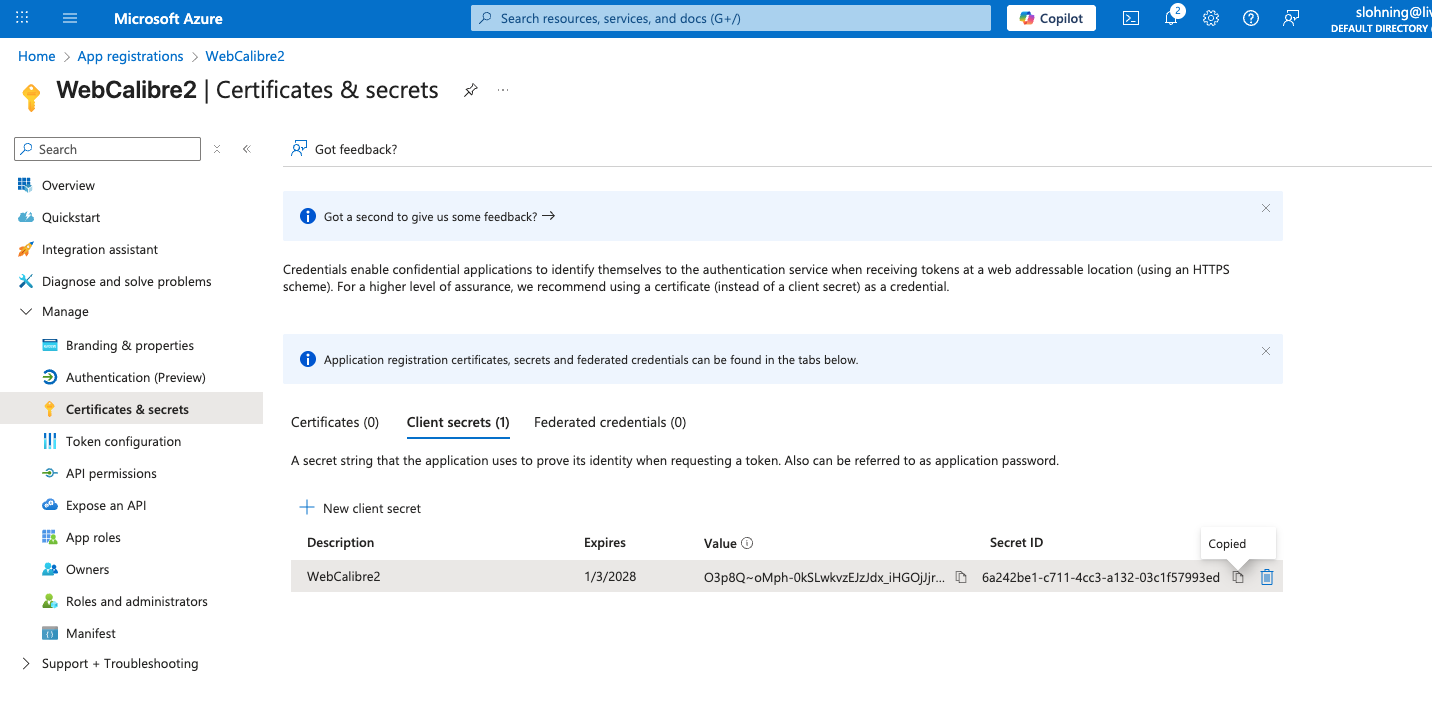
Since you are using NextAuth.js, the URL must follow a very specific pattern.
For local development: http://localhost:3000/api/auth/callback/azure-ad
For production: https://your-domain.com/api/auth/callback/azure-ad
Note: Replace azure-ad with whatever ID you give the provider in your code. By default, in NextAuth, it is usually azure-ad.
WebCalibre3
|Display name | WebCalibre3
|------------------------|-------------------------------------|
|Application (client) ID |a95ef644-cb9d-465c-8dae-f822a78a8ac3 |
|Object ID |1e1f2bda-661c-4ad0-9aae-82313c603076 |
|Directory (tenant) ID. |1c06ce7c-7884-4796-8652-d4c32d75a5d0 |
Client credentials
| Description | Expires | Value | Secret ID
|--------------|---------|-----------------------------------------|------------------------------------|
| WebCalibre3 |1/5/2028 |VZ48Q~EOsgZcgBI25cc0zys.h9zM7hN9I7DhZdnW |d647cf28-80ed-45fb-a89e-e2bc323a40e9|
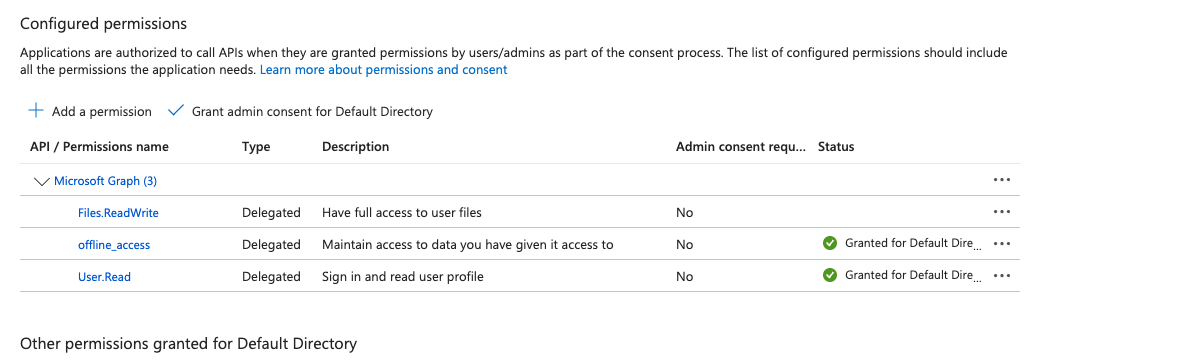
## 3.1. Permissions Needed
# 4. Steps
## 4.1. create nextjs app
The following command creates the nextjs folder structure
Yes, Next.js has a specific syntax to create a project in your current directory instead of creating a new subfolder.
To do this, navigate to your empty project folder in the terminal and run:
```Bash
npx create-next-app@latest .
```
**Important Details:**
1. The Dot (.): This tells the installer to use the current directory as the project root.
2. Naming Conflict: If the folder name contains capital letters (e.g., WebCalibre), the command will fail with an error. Next.js requires the root folder name to be all lowercase and URL-friendly. You must rename your folder to web-calibre before running the command.
This caused me rename to all lower case.
3.Empty Folder: The directory must be empty (except for hidden files like .git). If you already have files in there, the installer will stop to prevent overwriting your work.
What happens next?
Even though you are using the current directory, the interactive prompt will still ask you:
"What is your project named?" You can just hit Enter to accept the current folder name.
Configuration: It will then ask you about TypeScript, ESLint, Tailwind CSS, the src/ directory, and the App Router.
Based on our previous discussions, I recommend selecting "Yes" for TypeScript, ESLint, Tailwind, the src/ directory, and the App Router to match the professional structure we planned for WebCalibre.
## 4.2. Create .env file
In Next.js, the distinction between .env and .env.local is primarily about security and **overriding defaults**.
While both store key-value pairs, they are handled differently by Git and the Next.js runtime.
1. Security & Version Control (Git)The most important reason is that .env.local is automatically ignored by Git in standard Next.js projects.
- .env: Intended for "safe" default values that you want to share with your entire team. It is committed to your repository so that every developer has the same baseline configuration.
- .env.local: Intended for secrets (API keys, database passwords, Azure secrets). Because it is not committed to Git, your private credentials never end up on GitHub or in your production code history.
2. Priority & Overriding
Next.js uses a "hierarchy" of loading.1 If you define the same variable in both files, .env.local wins.
This allows you to set a generic placeholder in .env for the team, but use your specific local developer settings on your own machine.
For example:
- In .env: DATABASE_URL=postgres://localhost:5432/mydb (The team's default)
- In .env.local:
DATABASE_URL=postgres://admin:password123@localhost:5432/my_private_dev_db (Your personal setup)
**The Next.js Loading Order**
Next.js looks for variables in this specific order (from highest priority to lowest):
1. process.env (System environment variables)
2. .env.development.local (Only during npm run dev)
3. .env.local (Available in all environments except test)
4. .env.development
5. .env (The final fallback)
```text
DATABASE_URL="postgresql://stephen:Web2025$$@192.168.1.210:5432/webcalibre2"
# Credentials for your Microsoft App (NextAuth)
AZURE_AD_CLIENT_ID="549931a-f491-436b-b7bc-d37d8ca3c17e"
AZURE_AD_CLIENT_SECRET="6a242be1-c711-4cc3-a132-03c1f57993ed"
AZURE_AD_TENANT_ID="1c06ce7c-7884-4796-8652-d4c32d75a5d0"
```
**Summary Comparison Table**
|Feature |.env |.env.local|
|----------|------|----------|
|Purpose| Shared defaults/constants|Private secrets & local overrides|
|Committed to Git?|Yes |No (Added to .gitignore)|
|Sensitive Data?| NEVER|YES (API Keys, Secrets)|
|Scope|All developers/environments|Just your machine|
**Best Practice Tip: ** Since .env.local isn't shared on GitHub, it’s a good idea to create a file named .env.example in your project. This file should contain the names of the keys (e.g., AZURE_AD_CLIENT_SECRET=) but leave the values blank, so other developers know which variables they need to create on their own machines.
## 4.3. Configure Git
Nextjs initializes git by default. But is doesn't add some configs that I do
git config --global push.followTags true
git remote add origin "/Users/stephenlohning/Library/CloudStorage/OneDrive-Personal/Documents/10_GIT_Repositories/124_WebCalibre2.git"
git remote -v
origin /Users/stephenlohning/Library/CloudStorage/OneDrive-Personal/Documents/10_GIT_Repositories/124_WebCalibre2.git (fetch)
origin /Users/stephenlohning/Library/CloudStorage/OneDrive-Personal/Documents/10_GIT_Repositories/124_WebCalibre2.git (push)
## 4.4. Test nextjs
```zsh
npm run dev
> 124_webcalibre2@0.1.0 dev
> next dev
▲ Next.js 16.1.1 (Turbopack)
- Local: http://localhost:3000
- Network: http://192.168.1.100:3000
- Environments: .env
✓ Starting...
✓ Ready in 648ms
```
If it working proceed
## 4.5. Check Authentication
I ran through the Video:-
[Next.js Authentication Made Easy with Microsoft Entra ID](https://www.youtube.com/watch?v=tNLrMKZ-xmc&t=5s)
## 4.6. Install NextAuth.js v5
npm install next-auth@beta
Setup Environment
The only environment variable that is mandatory is the AUTH_SECRET. This is a random value used by the library to encrypt tokens and email verification hashes. (See Deployment to learn more). You can generate one via the official Auth.js CLI running:
npx auth secret
created .env.local
```text
AUTH_SECRET="7cz3Z4kUI2kB3mdAPo58iioUDLSRJ92X8+boEixvO8k=" # Added by `npx auth`. Read more: https://cli.authjs.dev
```
# 5. .env files
## 5.1. .env.local
```text
# values generated by Gemini
# Generated for security
AUTH_SECRET="7cz3Z4kUI2kB3mdAPo58iioUDLSRJ92X8+boEixvO8k="
# Use 'common' for multi-tenant (Work + Personal) support
AUTH_MICROSOFT_ENTRA_ID_TENANT_ID="common"
# The Application (client) ID
AUTH_MICROSOFT_ENTRA_ID_ID="b549931a-f491-436b-b7bc-d37d8ca3c17e"
# The Client Secret VALUE (ensure no leading '6' or spaces)
AUTH_MICROSOFT_ENTRA_ID_SECRET="O3p8Q~oMph-0kSLwkvzEJzJdx_iHGOjJjrr5Pa1A"
# Required to tell Auth.js to trust your localhost/proxy URL
AUTH_TRUST_HOST=true
```
## 5.2. .env
```
DATABASE_URL="postgresql://stephen:Web2025$$@192.168.1.210:5432/webcalibre2"
# Credentials for your Microsoft App (NextAuth)
AZURE_AD_CLIENT_ID="549931a-f491-436b-b7bc-d37d8ca3c17e"
AZURE_AD_CLIENT_SECRET="6a242be1-c711-4cc3-a132-03c1f57993ed"
AZURE_AD_TENANT_ID="1c06ce7c-7884-4796-8652-d4c32d75a5d0"
```
# 6. Prisma Install
To get Prisma fully installed and ready to talk to your PostgreSQL database, you need to install the CLI (for migrations) and the Client (for your code to query the database).
Run these three commands in your terminal:
1. Install the Prisma packages
Bash
## 6.1. The CLI is for development tasks like migrations
npm install prisma --save-dev
##The Client is used by your Next.js code to talk to the DB
```zsh
npm install @prisma/client
```
2. Install the Dotenv helper
Since you are keeping your DATABASE_URL in .env.local (and your password has special characters), you need this to bridge the gap between Next.js and the Prisma CLI:
```zsh
npm install dotenv-cli --save-dev
```
3. Initialize and Generate
Once the packages are installed, you need to initialize the Prisma folder (if you haven't already) and generate the types for your FileNode model:
Bash
## 6.2. Create the prisma folder
```zsh
npx prisma init
```
# 7. Run this whenever you change your schema.prisma file
npx dotenv -e .env.local -- npx prisma generate
4. Apply your Schema to PostgreSQL
Finally, run this to actually create the tables in your webcalibre2 database:
npx dotenv -e .env.local -- npx prisma migrate dev --name init_database
## 7.1. Pro-Tip: Update your package.json
To avoid typing that long dotenv command every time, open your package.json and add this to the "scripts" section:
JSON
"scripts": {
"db:migrate": "dotenv -e .env.local -- prisma migrate dev",
"db:studio": "dotenv -e .env.local -- prisma studio"
}
Now, you can just run npm run db:migrate whenever you update your schema!
# 8. Where we are up to 8/1/2026
We can authenticate with MS Azure, upload a file and store it on my personal OneDrive.
I can see a few problems,
1. if the file gets stored with its original filename, if I store the same file again it tells that it fail, but in reality it did not fail the it got renamed with 1.pdf added this is not added data base.
2. We may be better to create a folder and put the file in the folder, to me the logical name would id of the file, but that is automatically create and assigned when the data is stored as a UUID.
3. We would have to create the UUID ourselves, so that we can create a folder with that specific UUID and store the file in the folder.
4. The Upload file Page needs to be able to create folder as well select a parent , add a description of either the file
# 9. Testing Creating And Uploading Folders and Files
The functionality works may not the best user interface
Projects ID 0371fdfe-a2d1-4f25-b229-804f299bc064
Project-1 ID c8eebe0e-6e90-4cfb-8e44-c05f7064f3b1 parentID 0371fdfe-a2d1-4f25-b229-804f299bc064
AS-NZS3000-2018.pdf parentID c8eebe0e-6e90-4cfb-8e44-c05f7064f3b1
Now we will go now and add metadata
Now we have the metadata along with some great filters on the data board page
Now we are going to implement an an update of a file or folder stored. 12/1/2026
For download there 2 function we need to implement
1) down load the file to ~/user/Downloads, this should work for any file type including pdf
2) if the file is a pdf open the file in another tab in the browser as most browser support reading a pdf
For download there 2 function we need to implement
1) down load the file to ~/user/Downloads, this should work for any file type including pdf
2) if the file is a pdf open the file in another tab in the browser as most browser support reading a pdf
So we need to implement 2 new actions, downLoad file and open pdf to read. Does this make sense ?
# 10. 📚 WebCalibre Development Notes 17/1/2026
## 10.1. 🚀 Project Overview
A Next.js (App Router) dashboard for managing a OneDrive-synced file library.
Uses **Prisma + PostgreSQL** for metadata storage and **MUI X v8 (DataGrid)** for the frontend.
---
## 10.2. 🛠 Critical Technical Learnings
### 10.2.1. MUI X v8 DataGrid Toolbar Fix
* **Problem:** The Search Bar and "Library" title often disappear even when defined in `slots`.
* **Solution:** - You MUST include the `showToolbar` prop on the ``.
- Use the **Persistent Quick Filter** model: set the `expanded` prop on the `` component within the custom toolbar to ensure it doesn't collapse.
- Use `slotProps.textField` (not `input`) to customize the search input in MUI v7/v8.
### 10.2.2. Global "Hidden" Search
* To allow the search bar to find "Author", "ISBN", or "Dimensions" without cluttering the UI:
- Create a column (e.g., `metadata_search`) with `width: 0`.
- Use a `valueGetter` to return `JSON.stringify(row.metadata)`.
- Hide the column in `initialState.columns.columnVisibilityModel`.
- The DataGrid filtering engine will now index this hidden string.
### 10.2.3. Server-Side Extraction
* Metadata extraction from file binaries (PDF, EPUB, Images) **must** occur on the server.
* Libraries like `sharp` and `pdf-parse` are Node.js-based and will crash if imported into client components.
---
## 10.3. 📑 Essential Commands
| Command | Purpose |
| :--- | :--- |
| `npx tsc --noEmit` | **Run this frequently.** Validates types across the entire project. Finds errors your IDE might miss. |
| `npx prisma generate` | Updates the Prisma Client types after schema changes. |
| `npx prisma db push` | Pushes schema changes to the PostgreSQL database. |
| `npm run dev` | Starts the development server. |
---
## 10.4. 📅 Future Roadmap
### 10.4.1. Phase 1: Metadata Utility (In Progress)
- [ ] Implement `src/lib/metadata-extractor.ts`.
- [ ] Integrate extraction into the `syncOneDrive` Server Action.
- [ ] Supported formats: PDF (`pdf-parse`), EPUB (`node-epub-utils`), Images (`sharp`).
### 10.4.2. Phase 2: UI Enhancements
- [ ] Add "Last Synced" timestamp state to the dashboard header.
- [ ] Add dedicated sortable columns for "Author" and "File Type".
- [ ] Implement folder-specific row styling.
---
## 10.5. 💡 Reminders
* **Hard Refresh:** If the DataGrid UI behaves weirdly after code changes, use `Cmd + Shift + R` or `Ctrl + F5`.
* **Z-Index:** The search bar animation uses `gridArea: '1 / 1'`. If icons overlap, check the styled-components logic in `dashboard-view.tsx`.
1.AUIAfM4GHIR4lkeGUtTDLXWl0BqTSbWR9GtDt7zTfYyjwX6kAElCAA.BQABAwIAAAADAOz_BQD0_yyFlWKgjcwr_ed5f58Tdi53aj4fqbWRmjTI7vE5M94UQZT5SZLBxnTN7Psa7w-KJCMfY3AAzGgJzfOXOHGXSySvCzC6IlHwXL7uXLZYf84jdhgNEP2F1E1nz9ecmsG4tfjvMzwNPsh9nlY48Cz_qh_KDLu2odNesttqW7Om3MxsXLakskvMXynX07lJT6gbXT9OMoFk_F3M4Dz9DoYJD6CACZPdKaYqMeesfPt-B6Yj7tq1q9L4RUc6Fbrsew9chMqg1vurMlggcX1aBU7LF6JP50B3IkOB4qXrGDJtxM61gF64EXRay5UYVtWMh09et7SX4FcLZlHTyxpsvjSxaKxfpY9DFY2y0dhp0Ce5dZXoK7pplQwcxsv-dCeZmk4A3dqvAdxM6p0XNrowlOawpAlWqHoIC1ZmESDpyxueP0rlpfD9h3wkWcVAG9xOS_d-W9Z3y1G9PgBycOysvQTufueLs4PCjjId9-5AI4UaecQyUtpRCJnOxp23_e5ROLduihcDMrV87D8_ZN6nl49jFqr7kQZHbLanuVht18vSUyk31c9OtkFmC4p48_1xoIe5sYlPjoUd9Misgef7EziwdzapRyr649kb4Em_XMmJf_Y5zVDpT6NXRqlQAw3AhP53Px12hQsGsFkd0kzDBuwUSrKlda5E2lom4Wg5uXwb4zLD5DA6xwKfxBrAYICZT8QQYG5fTHjSP_2t9gs_K9-1-7UqKTb2VWGYf25QVnhgBXL1KbzosmFBOKjr31XjYo8IbgMjuEDGP-YfmyYOvmRg2Lx-VNlu8gTPcdSsdIivFSvEvHdUmIeReHMIdKjr0ZgVYwTtzG7QBs-8UXRvNo6IWecZnHEjx0QSLztyNXicgeOmT4gKDeJ0YT6rkWkNg_B8fYpx3j11ceRKpgQzm2E7UalGgBsbAHA1a4jnM7NrDv4TY_A_LRTabHPVrHpQWZ2HOJi5UlTQLv8xbiiJf94HVlxwncJd6YPy7ARjhvIA5nE5IiZJ8ZSUFwg4waCFibV-NDqiglo7YBCfx3DOrLsNjuufYQnjog_IDi6ac-DG7ulKS01nmAq7WfvshiW_mXLmwtPVusAcmLcfD-40B3kh12Cv-_EXSzfaVPP7M1Obi13TyoQDeVl-pMJuEC68xHzqA78SmZR8WluDRAJ5kOLBggvPbuHRFpkqtvFG8sGNzOqiBkq30qUErfk2Ao-SnHAh3fa3CAM2aYf3LdzXHh2_qGoVnrKdMfnUI14H6vrTxxBpDUinYejr8rLzbjH6tjDYWvjen5-BrDzOjazI7_ctS8zdLugG093kbWlYDW26FgYnKtdPCi-7F-emm8HGD82V_5e7Jc1qVs1G_D5eu0ohb_B1ky_AmxgCE8oL9Bdx1ehHnijNCarubf_MWMcloAv0XNxvrU4PoXdb7PgVBpYsKRT7tdnOGpokQj2n2xQSHvQVypd8xkHYloczdlmi9zvytM_Da8jnLdE0Td3mlnI-jlovrbzykD4YhS_ZcwIc_8c_WiHDeC3yAeTTx0EhuNh89HFSsmfod2BBaRgvf5SRpNwUjxd0PROvrGD_Hl0emtsC9YWdfULQBk3SKqJMV0x7Zv_Erj8JZoMzXbe8jv5bM4AmYqOPqznkXtAWAkedqLVYug0od9AgMIn-FFPpH4AvmHhhliMevIw74yEXCj28dxlHBZvyyqpbEwp8vr_kTjarjyp3s1p6QsYEoQ82vx-nQPiVFwWeGDsJcSmUD4FbtVIVCGY3p2cCtZHyRRWAK2LGgO32v3DhK7FSLKV-3f0LAafqdpZyGnqoF7pwn_RcpZz8l9tGctFl8Xd50Y1naLz8F08SlbJ197xdjzHLQ8r4jsVn5m9BkGbR0Kv3olXGRmtr5dkqGI-68_FCjkkqpwfOHg
1.AUIAfM4GHIR4lkeGUtTDLXWl0BqTSbWR9GtDt7zTfYyjwX6kAElCAA.BQABAwIAAAADAOz_BQD0_yyFlWKgjcwr_ed5f58Tdi53aj4fqbWRmjTI7vE5M94UQZT5SZLBxnTN7Psa7w-KJCMfY3AAzGgJzfOXOHGXSySvCzC6IlHwXL7uXLZYf84jdhgNEP2F1E1nz9ecmsG4tfjvMzwNPsh9nlY48Cz_qh_KDLu2odNesttqW7Om3MxsXLakskvMXynX07lJT6gbXT9OMoFk_F3M4Dz9DoYJD6CACZPdKaYqMeesfPt-B6Yj7tq1q9L4RUc6Fbrsew9chMqg1vurMlggcX1aBU7LF6JP50B3IkOB4qXrGDJtxM61gF64EXRay5UYVtWMh09et7SX4FcLZlHTyxpsvjSxaKxfpY9DFY2y0dhp0Ce5dZXoK7pplQwcxsv-dCeZmk4A3dqvAdxM6p0XNrowlOawpAlWqHoIC1ZmESDpyxueP0rlpfD9h3wkWcVAG9xOS_d-W9Z3y1G9PgBycOysvQTufueLs4PCjjId9-5AI4UaecQyUtpRCJnOxp23_e5ROLduihcDMrV87D8_ZN6nl49jFqr7kQZHbLanuVht18vSUyk31c9OtkFmC4p48_1xoIe5sYlPjoUd9Misgef7EziwdzapRyr649kb4Em_XMmJf_Y5zVDpT6NXRqlQAw3AhP53Px12hQsGsFkd0kzDBuwUSrKlda5E2lom4Wg5uXwb4zLD5DA6xwKfxBrAYICZT8QQYG5fTHjSP_2t9gs_K9-1-7UqKTb2VWGYf25QVnhgBXL1KbzosmFBOKjr31XjYo8IbgMjuEDGP-YfmyYOvmRg2Lx-VNlu8gTPcdSsdIivFSvEvHdUmIeReHMIdKjr0ZgVYwTtzG7QBs-8UXRvNo6IWecZnHEjx0QSLztyNXicgeOmT4gKDeJ0YT6rkWkNg_B8fYpx3j11ceRKpgQzm2E7UalGgBsbAHA1a4jnM7NrDv4TY_A_LRTabHPVrHpQWZ2HOJi5UlTQLv8xbiiJf94HVlxwncJd6YPy7ARjhvIA5nE5IiZJ8ZSUFwg4waCFibV-NDqiglo7YBCfx3DOrLsNjuufYQnjog_IDi6ac-DG7ulKS01nmAq7WfvshiW_mXLmwtPVusAcmLcfD-40B3kh12Cv-_EXSzfaVPP7M1Obi13TyoQDeVl-pMJuEC68xHzqA78SmZR8WluDRAJ5kOLBggvPbuHRFpkqtvFG8sGNzOqiBkq30qUErfk2Ao-SnHAh3fa3CAM2aYf3LdzXHh2_qGoVnrKdMfnUI14H6vrTxxBpDUinYejr8rLzbjH6tjDYWvjen5-BrDzOjazI7_ctS8zdLugG093kbWlYDW26FgYnKtdPCi-7F-emm8HGD82V_5e7Jc1qVs1G_D5eu0ohb_B1ky_AmxgCE8oL9Bdx1ehHnijNCarubf_MWMcloAv0XNxvrU4PoXdb7PgVBpYsKRT7tdnOGpokQj2n2xQSHvQVypd8xkHYloczdlmi9zvytM_Da8jnLdE0Td3mlnI-jlovrbzykD4YhS_ZcwIc_8c_WiHDeC3yAeTTx0EhuNh89HFSsmfod2BBaRgvf5SRpNwUjxd0PROvrGD_Hl0emtsC9YWdfULQBk3SKqJMV0x7Zv_Erj8JZoMzXbe8jv5bM4AmYqOPqznkXtAWAkedqLVYug0od9AgMIn-FFPpH4AvmHhhliMevIw74yEXCj28dxlHBZvyyqpbEwp8vr_kTjarjyp3s1p6QsYEoQ82vx-nQPiVFwWeGDsJcSmUD4FbtVIVCGY3p2cCtZHyRRWAK2LGgO32v3DhK7FSLKV-3f0LAafqdpZyGnqoF7pwn_RcpZz8l9tGctFl8Xd50Y1naLz8F08SlbJ197xdjzHLQ8r4jsVn5m9BkGbR0Kv3olXGRmtr5dkqGI-68_FCjkkqpwfOHg
1.AUIAfM4GHIR4lkeGUtTDLXWl0BqTSbWR9GtDt7zTfYyjwX6kAElCAA.BQABAwIAAAADAOz_BQD0_yyFlWKgjcwr_ed5f58Tdi53aj4fqbWRmjTI7vE5M94UQZT5SZLBxnTN7Psa7w-KJCMfY3AAzGgJzfOXOHGXSySvCzC6IlHwXL7uXLZYf84jdhgNEP2F1E1nz9ecmsG4tfjvMzwNPsh9nlY48Cz_qh_KDLu2odNesttqW7Om3MxsXLakskvMXynX07lJT6gbXT9OMoFk_F3M4Dz9DoYJD6CACZPdKaYqMeesfPt-B6Yj7tq1q9L4RUc6Fbrsew9chMqg1vurMlggcX1aBU7LF6JP50B3IkOB4qXrGDJtxM61gF64EXRay5UYVtWMh09et7SX4FcLZlHTyxpsvjSxaKxfpY9DFY2y0dhp0Ce5dZXoK7pplQwcxsv-dCeZmk4A3dqvAdxM6p0XNrowlOawpAlWqHoIC1ZmESDpyxueP0rlpfD9h3wkWcVAG9xOS_d-W9Z3y1G9PgBycOysvQTufueLs4PCjjId9-5AI4UaecQyUtpRCJnOxp23_e5ROLduihcDMrV87D8_ZN6nl49jFqr7kQZHbLanuVht18vSUyk31c9OtkFmC4p48_1xoIe5sYlPjoUd9Misgef7EziwdzapRyr649kb4Em_XMmJf_Y5zVDpT6NXRqlQAw3AhP53Px12hQsGsFkd0kzDBuwUSrKlda5E2lom4Wg5uXwb4zLD5DA6xwKfxBrAYICZT8QQYG5fTHjSP_2t9gs_K9-1-7UqKTb2VWGYf25QVnhgBXL1KbzosmFBOKjr31XjYo8IbgMjuEDGP-YfmyYOvmRg2Lx-VNlu8gTPcdSsdIivFSvEvHdUmIeReHMIdKjr0ZgVYwTtzG7QBs-8UXRvNo6IWecZnHEjx0QSLztyNXicgeOmT4gKDeJ0YT6rkWkNg_B8fYpx3j11ceRKpgQzm2E7UalGgBsbAHA1a4jnM7NrDv4TY_A_LRTabHPVrHpQWZ2HOJi5UlTQLv8xbiiJf94HVlxwncJd6YPy7ARjhvIA5nE5IiZJ8ZSUFwg4waCFibV-NDqiglo7YBCfx3DOrLsNjuufYQnjog_IDi6ac-DG7ulKS01nmAq7WfvshiW_mXLmwtPVusAcmLcfD-40B3kh12Cv-_EXSzfaVPP7M1Obi13TyoQDeVl-pMJuEC68xHzqA78SmZR8WluDRAJ5kOLBggvPbuHRFpkqtvFG8sGNzOqiBkq30qUErfk2Ao-SnHAh3fa3CAM2aYf3LdzXHh2_qGoVnrKdMfnUI14H6vrTxxBpDUinYejr8rLzbjH6tjDYWvjen5-BrDzOjazI7_ctS8zdLugG093kbWlYDW26FgYnKtdPCi-7F-emm8HGD82V_5e7Jc1qVs1G_D5eu0ohb_B1ky_AmxgCE8oL9Bdx1ehHnijNCarubf_MWMcloAv0XNxvrU4PoXdb7PgVBpYsKRT7tdnOGpokQj2n2xQSHvQVypd8xkHYloczdlmi9zvytM_Da8jnLdE0Td3mlnI-jlovrbzykD4YhS_ZcwIc_8c_WiHDeC3yAeTTx0EhuNh89HFSsmfod2BBaRgvf5SRpNwUjxd0PROvrGD_Hl0emtsC9YWdfULQBk3SKqJMV0x7Zv_Erj8JZoMzXbe8jv5bM4AmYqOPqznkXtAWAkedqLVYug0od9AgMIn-FFPpH4AvmHhhliMevIw74yEXCj28dxlHBZvyyqpbEwp8vr_kTjarjyp3s1p6QsYEoQ82vx-nQPiVFwWeGDsJcSmUD4FbtVIVCGY3p2cCtZHyRRWAK2LGgO32v3DhK7FSLKV-3f0LAafqdpZyGnqoF7pwn_RcpZz8l9tGctFl8Xd50Y1naLz8F08SlbJ197xdjzHLQ8r4jsVn5m9BkGbR0Kv3olXGRmtr5dkqGI-68_FCjkkqpwfOHg
##
```ts
export async function getMetadataPreviewAction(fileId: string) {
const session = await auth();
if (!session?.user?.id) throw new Error("Unauthorized");
console.log(`\n--- 🔍 Magic Fill Started for File ID: ${fileId} ---`);
try {
const node = await getFileNodeById(fileId);
if (!node || !node.oneDriveId) throw new Error("File not found");
// 1. Get the token from our utility
const token = await getFreshAccessToken(session.user.id);
// LOG: Just check the length to be sure it's not empty
console.log(`🔑 Token retrieved (Length: ${token.length})`);
console.log(`📡 Fetching binary for: ${node.name}...`);
// 2. Fetch the content from Microsoft Graph
const response = await fetch(
`https://graph.microsoft.com/v1.0/me/drive/items/${node.oneDriveId}/content`,
{
headers: {
'Authorization': `Bearer ${token}`,
'Accept': '*/*'
},
}
);
if (!response.ok) {
// If it fails here, we'll see the real reason from Microsoft
const errorText = await response.text();
console.error("❌ Microsoft Graph Error Response:", errorText);
throw new Error(`OneDrive Download Failed: ${response.status}`);
}
const arrayBuffer = await response.arrayBuffer();
const buffer = Buffer.from(arrayBuffer);
console.log(`📦 Success! Downloaded ${buffer.length} bytes.`);
// 3. Extract Metadata
const extractedData = await extractMetadata(buffer, node.name);
console.log("✅ RAW DATA EXTRACTED:");
console.dir(extractedData, { depth: null, colors: true });
return { success: true, data: extractedData };
} catch (error: any) {
console.error("❌ Magic Fill Error:", error.message);
return { success: false, error: error.message };
}
}
```
## Dump of metadata for an image
```zsh
npm run dev
> 124_webcalibre2@0.1.0 dev
> next dev
▲ Next.js 16.1.1 (Turbopack)
- Local: http://localhost:3000
- Network: http://192.168.1.100:3000
- Environments: .env.local, .env
- Experiments (use with caution):
· serverActions
✓ Starting...
✓ Ready in 380ms
✅ Prisma 7 connected to PostgreSQL successfully
GET /dashboard 200 in 643ms (compile: 139ms, proxy.ts: 115ms, render: 388ms)
✅ Prisma 7 connected to PostgreSQL successfully
GET /update/d3ccd68a-0493-487d-9273-5fa8ff6a6f9a 200 in 329ms (compile: 274ms, proxy.ts: 19ms, render: 37ms)
--- 🔍 Magic Fill Started for File ID: d3ccd68a-0493-487d-9273-5fa8ff6a6f9a ---
🔄 Access token expired. Refreshing for user: cc6f11ff-549d-40fa-883f-7886ee6487cf
✅ Prisma 7 connected to PostgreSQL successfully
🔑 Token retrieved (Length: 1484)
📡 Fetching binary for: IMG_2360.jpeg...
📦 Success! Downloaded 1233596 bytes.
📸 FULL RAW EXIF DATA: {
"bigEndian": true,
"Image": {
"Make": "Apple",
"Model": "iPhone 14",
"Orientation": 1,
"XResolution": 72,
"YResolution": 72,
"ResolutionUnit": 2,
"Software": "18.6.2",
"DateTime": "2025-10-03T08:02:39.000Z",
"HostComputer": "iPhone 14",
"YCbCrPositioning": 1,
"ExifTag": 228,
"GPSTag": 2586
},
"Thumbnail": {
"Compression": 6,
"XResolution": 72,
"YResolution": 72,
"ResolutionUnit": 2,
"JPEGInterchangeFormat": 2990,
"JPEGInterchangeFormatLength": 3322
},
"Photo": {
"ExposureTime": 0.025,
"FNumber": 1.5,
"ExposureProgram": 2,
"ISOSpeedRatings": 500,
"ExifVersion": {
"type": "Buffer",
"data": [
48,
50,
51,
50
]
},
"DateTimeOriginal": "2025-10-03T08:02:39.000Z",
"DateTimeDigitized": "2025-10-03T08:02:39.000Z",
"OffsetTime": "+02:00",
"OffsetTimeOriginal": "+02:00",
"OffsetTimeDigitized": "+02:00",
"ComponentsConfiguration": {
"type": "Buffer",
"data": [
1,
2,
3,
0
]
},
"ShutterSpeedValue": 5.327015336217066,
"ApertureValue": 1.1699250021066825,
"BrightnessValue": -0.4198113650227582,
"ExposureBiasValue": 0,
"MeteringMode": 5,
"Flash": 16,
"FocalLength": 5.7,
"SubjectArea": [
2006,
1506,
2213,
1327
],
"MakerNote": {
"type": "Buffer",
"data": [
65,
112,
112,
108,
101,
32,
105,
79,
83,
0,
0,
1,
77,
77,
0,
49,
0,
1,
0,
9,
0,
0,
0,
1,
0,
0,
0,
15,
0,
2,
0,
7,
0,
0,
2,
0,
0,
0,
2,
96,
0,
3,
0,
7,
0,
0,
0,
104,
0,
0,
4,
96,
0,
4,
0,
9,
0,
0,
0,
1,
0,
0,
0,
1,
0,
5,
0,
9,
0,
0,
0,
1,
0,
0,
0,
149,
0,
6,
0,
9,
0,
0,
0,
1,
0,
0,
0,
152,
0,
7,
0,
9,
0,
0,
0,
1,
0,
0,
0,
1,
0,
8,
0,
10,
0,
0,
0,
3,
0,
0,
4,
200,
0,
12,
0,
10,
0,
0,
0,
2,
0,
0,
4,
224,
0,
13,
0,
9,
0,
0,
0,
1,
0,
0,
0,
39,
0,
14,
0,
9,
0,
0,
0,
1,
0,
0,
0,
0,
0,
16,
0,
9,
0,
0,
0,
1,
0,
0,
0,
1,
0,
20,
0,
9,
0,
0,
0,
1,
0,
0,
0,
12,
0,
22,
0,
7,
0,
0,
0,
72,
0,
0,
4,
240,
0,
23,
0,
16,
0,
0,
0,
1,
0,
0,
5,
56,
0,
25,
0,
9,
0,
0,
0,
1,
0,
0,
32,
2,
0,
26,
0,
2,
0,
0,
0,
6,
0,
0,
5,
64,
0,
31,
0,
9,
0,
0,
0,
1,
0,
0,
0,
0,
0,
32,
0,
2,
0,
0,
0,
37,
0,
0,
5,
70,
0,
33,
0,
10,
0,
0,
0,
1,
0,
0,
5,
107,
0,
35,
0,
9,
0,
0,
0,
2,
0,
0,
5,
115,
0,
37,
0,
16,
0,
0,
0,
1,
0,
0,
5,
123,
0,
38,
0,
9,
0,
0,
0,
1,
0,
0,
0,
3,
0,
39,
0,
10,
0,
0,
0,
1,
0,
0,
5,
131,
0,
43,
0,
2,
0,
0,
0,
37,
0,
0,
5,
139,
0,
45,
0,
9,
0,
0,
0,
1,
0,
0,
30,
150,
0,
46,
0,
9,
0,
0,
0,
1,
0,
0,
0,
1,
0,
47,
0,
9,
0,
0,
0,
1,
0,
0,
0,
48,
0,
48,
0,
10,
0,
0,
0,
1,
0,
0,
5,
176,
0,
54,
0,
9,
0,
0,
0,
1,
0,
0,
0,
42,
0,
55,
0,
9,
0,
0,
0,
1,
0,
0,
0,
4,
0,
58,
0,
9,
0,
0,
0,
1,
0,
0,
0,
0,
0,
59,
0,
9,
0,
0,
0,
1,
0,
0,
0,
0,
0,
60,
0,
9,
0,
0,
0,
1,
0,
0,
0,
4,
0,
63,
0,
9,
0,
0,
0,
1,
0,
0,
0,
0,
0,
64,
0,
7,
0,
0,
0,
74,
0,
0,
5,
184,
0,
65,
0,
9,
0,
0,
0,
1,
0,
0,
0,
0,
0,
67,
0,
9,
0,
0,
0,
1,
0,
0,
0,
0,
0,
68,
0,
9,
0,
0,
0,
1,
0,
0,
0,
0,
0,
69,
0,
9,
0,
0,
0,
1,
0,
0,
0,
0,
0,
70,
0,
9,
0,
0,
0,
1,
0,
0,
0,
0,
0,
74,
0,
9,
0,
0,
0,
1,
0,
0,
0,
2,
0,
77,
0,
10,
0,
0,
0,
1,
0,
0,
6,
2,
0,
78,
0,
7,
0,
0,
0,
121,
0,
0,
6,
10,
0,
79,
0,
7,
0,
0,
0,
43,
0,
0,
6,
131,
0,
82,
0,
9,
0,
0,
0,
1,
0,
0,
0,
11,
0,
83,
0,
9,
0,
0,
0,
1,
0,
0,
0,
1,
0,
85,
0,
9,
0,
0,
0,
1,
0,
0,
0,
0,
0,
88,
0,
9,
0,
0,
0,
1,
0,
0,
7,
3,
0,
0,
0,
0,
239,
1,
205,
1,
169,
1,
135,
1,
103,
1,
73,
1,
45,
1,
19,
1,
251,
0,
228,
0,
207,
0,
188,
0,
172,
0,
158,
0,
146,
0,
136,
0,
54,
2,
17,
2,
232,
1,
193,
1,
155,
1,
118,
1,
85,
1,
55,
1,
26,
1,
0,
1,
231,
0,
209,
0,
189,
0,
173,
0,
160,
0,
147,
0,
125,
2,
89,
2,
47,
2,
2,
2,
216,
1,
175,
1,
137,
1,
99,
1,
64,
1,
33,
1,
4,
1,
233,
0,
210,
0,
190,
0,
173,
0,
159,
0,
8,
3,
217,
2,
170,
2,
120,
2,
65,
2,
13,
2,
218,
1,
171,
1,
125,
1,
83,
1,
44,
1,
10,
1,
235,
0,
210,
0,
188,
0,
170,
0,
252,
2,
242,
2,
210,
2,
170,
2,
131,
2,
81,
2,
30,
2,
230,
1,
175,
1,
124,
1,
77,
1,
36,
1,
255,
0,
225,
0,
199,
0,
178,
0,
69,
1,
93,
1,
121,
1,
168,
1,
208,
1,
206,
1,
193,
1,
168,
1,
135,
1,
107,
1,
69,
1,
32,
1,
251,
0,
220,
0,
196,
0,
176,
0,
183,
0,
185,
0,
182,
0,
183,
0,
181,
0,
182,
0,
175,
0,
179,
0,
192,
0,
183,
0,
178,
0,
169,
0,
158,
0,
143,
0,
139,
0,
131,
0,
173,
0,
179,
0,
173,
0,
185,
0,
187,
0,
231,
0,
145,
1,
164,
1,
147,
1,
107,
1,
38,
1,
157,
0,
139,
0,
166,
0,
169,
0,
152,
0,
36,
0,
55,
0,
64,
0,
58,
0,
57,
0,
55,
0,
56,
0,
50,
0,
45,
0,
42,
0,
37,
0,
27,
0,
25,
0,
23,
0,
30,
0,
43,
0,
10,
0,
11,
0,
12,
0,
14,
0,
19,
0,
23,
0,
25,
0,
24,
0,
23,
0,
21,
0,
20,
0,
18,
0,
17,
0,
16,
0,
16,
0,
16,
0,
6,
0,
7,
0,
7,
0,
9,
0,
11,
0,
9,
0,
12,
0,
12,
0,
15,
0,
13,
0,
13,
0,
12,
0,
11,
0,
10,
0,
9,
0,
10,
0,
4,
0,
5,
0,
6,
0,
6,
0,
7,
0,
9,
0,
9,
0,
9,
0,
9,
0,
9,
0,
10,
0,
9,
0,
9,
0,
6,
0,
7,
0,
7,
0,
4,
0,
4,
0,
5,
0,
4,
0,
5,
0,
6,
0,
6,
0,
6,
0,
7,
0,
8,
0,
8,
0,
8,
0,
6,
0,
5,
0,
5,
0,
5,
0,
4,
0,
4,
0,
4,
0,
4,
0,
4,
0,
4,
0,
4,
0,
4,
0,
4,
0,
4,
0,
6,
0,
6,
0,
4,
0,
5,
0,
4,
0,
4,
0,
5,
0,
4,
0,
4,
0,
5,
0,
4,
0,
4,
0,
4,
0,
4,
0,
4,
0,
4,
0,
5,
0,
5,
0,
4,
0,
5,
0,
3,
0,
5,
0,
6,
0,
7,
0,
6,
0,
5,
0,
4,
0,
5,
0,
5,
0,
4,
0,
4,
0,
4,
0,
5,
0,
3,
0,
3,
0,
4,
0,
4,
0,
5,
0,
98,
112,
108,
105,
115,
116,
48,
48,
212,
1,
2,
3,
4,
5,
6,
7,
8,
85,
102,
108,
97,
103,
115,
85,
118,
97,
108,
117,
101,
89,
116,
105,
109,
101,
115,
99,
97,
108,
101,
85,
101,
112,
111,
99,
104,
16,
1,
19,
0,
1,
62,
142,
239,
162,
85,
109,
18,
59,
154,
202,
0,
16,
0,
8,
17,
23,
29,
39,
45,
47,
56,
61,
0,
0,
0,
0,
0,
0,
1,
1,
0,
0,
0,
0,
0,
0,
0,
9,
0,
0,
0,
0,
0,
0,
0,
0,
0,
0,
0,
0,
0,
0,
0,
63,
255,
255,
84,
169,
0,
0,
168,
221,
0,
0,
54,
115,
0,
9,
142,
158,
255,
255,
244,
153,
0,
2,
69,
230,
0,
0,
0,
91,
0,
0,
0,
128,
0,
0,
0,
81,
0,
0,
1,
0,
98,
112,
108,
105,
115,
116,
48,
48,
95,
16,
28,
65,
88,
118,
67,
67,
48,
55,
76,
49,
117,
79,
73,
113,
48,
73,
98,
101,
51,
76,
121,
112,
112,
98,
98,
86,
43,
108,
113,
8,
0,
0,
0,
0,
0,
0,
1,
1,
0,
0,
0,
0,
0,
0,
0,
1,
0,
0,
0,
0,
0,
0,
0,
0,
0,
0,
0,
0,
0,
0,
0,
39,
0,
0,
0,
0,
0,
80,
32,
4,
113,
55,
53,
48,
110,
0,
55,
67,
65,
54,
53,
50,
48,
68,
45,
67,
50,
49,
55,
45,
52,
56,
68,
49,
45,
56,
48,
49,
67,
45,
50,
69,
49,
57,
54,
69,
66,
66,
68,
52,
65,
50,
0,
0,
0,
249,
65,
0,
1,
39,
154,
0,
0,
1,
55,
16,
0,
0,
27,
0,
0,
0,
0,
0,
0,
20,
142,
0,
2,
96,
195,
0,
0,
19,
224,
51,
67,
53,
51,
52,
69,
66,
69,
45,
52,
65,
53,
51,
45,
52,
55,
69,
70,
45,
57,
49,
55,
65,
45,
66,
55,
56,
53,
57,
55,
51,
55,
50,
53,
57,
52,
0,
0,
0,
0,
0,
0,
0,
0,
1,
98,
112,
108,
105,
115,
116,
48,
48,
212,
1,
2,
3,
4,
5,
6,
6,
7,
81,
51,
81,
49,
81,
50,
81,
48,
16,
0,
34,
0,
0,
0,
0,
16,
1,
8,
17,
19,
21,
23,
25,
27,
32,
0,
0,
0,
0,
0,
0,
1,
1,
0,
0,
0,
0,
0,
0,
0,
8,
0,
0,
0,
0,
0,
0,
0,
0,
0,
0,
0,
0,
0,
0,
0,
34,
0,
2,
38,
42,
0,
0,
19,
59,
98,
112,
108,
105,
115,
116,
48,
48,
210,
1,
2,
3,
4,
81,
49,
81,
50,
16,
3,
162,
5,
10,
210,
6,
7,
8,
9,
83,
50,
46,
49,
83,
50,
46,
50,
35,
64,
157,
225,
32,
96,
0,
0,
0,
35,
64,
124,
160,
0,
0,
0,
0,
0,
210,
6,
7,
11,
12,
35,
0,
0,
0,
0,
0,
0,
0,
0,
35,
64,
72,
0,
0,
0,
0,
0,
0,
8,
13,
15,
17,
19,
22,
27,
31,
35,
44,
53,
58,
67,
0,
0,
0,
0,
0,
0,
1,
1,
0,
0,
0,
0,
0,
0,
0,
13,
0,
0,
0,
0,
0,
0,
0,
0,
0,
0,
0,
0,
0,
0,
0,
76,
98,
112,
108,
105,
115,
116,
48,
48,
16,
0,
8,
0,
0,
0,
0,
0,
0,
1,
1,
0,
0,
0,
0,
0,
0,
0,
1,
0,
0,
0,
0,
0,
0,
0,
0,
0,
0,
0,
0,
0,
0,
0,
10
]
},
"SubSecTimeOriginal": "714",
"SubSecTimeDigitized": "714",
"FlashpixVersion": {
"type": "Buffer",
"data": [
48,
49,
48,
48
]
},
"ColorSpace": 65535,
"PixelXDimension": 4032,
"PixelYDimension": 3024,
"SensingMethod": 2,
"SceneType": {
"type": "Buffer",
"data": [
1
]
},
"ExposureMode": 0,
"WhiteBalance": 0,
"FocalLengthIn35mmFilm": 26,
"SceneCaptureType": 0,
"LensSpecification": [
1.5399999618512084,
5.699999809263318,
1.5,
2.4
],
"LensMake": "Apple",
"LensModel": "iPhone 14 back dual wide camera 5.7mm f/1.5",
"CompositeImage": 2
},
"GPSInfo": {
"GPSLatitudeRef": "N",
"GPSLatitude": [
42,
42,
22.91
],
"GPSLongitudeRef": "W",
"GPSLongitude": [
7,
1,
50.76
],
"GPSAltitudeRef": 0,
"GPSAltitude": 1265.3340248962656,
"GPSTimeStamp": [
6,
2,
39
],
"GPSSpeedRef": "K",
"GPSSpeed": 0,
"GPSImgDirectionRef": "T",
"GPSImgDirection": 147.2551498127341,
"GPSDestBearingRef": "T",
"GPSDestBearing": 147.2551498127341,
"GPSDateStamp": "2025:10:03",
"GPSHPositioningError": 4.748651528267963
}
}
✅ RAW DATA EXTRACTED:
{
type: 'IMAGE (JPEG)',
dimensions: '4032x3024',
title: 'IMG_2360.jpeg'
}
POST /update/d3ccd68a-0493-487d-9273-5fa8ff6a6f9a 200 in 4.0s (compile: 9ms, proxy.ts: 19ms, render: 4.0s)
```
## Where the code should exist
Two questions
1) should the
// 2. Fetch the content from Microsoft Graph
const response = await fetch(
`https://graph.microsoft.com/v1.0/me/drive/items/${node.oneDriveId}/content`,
{
headers: {
'Authorization': `Bearer ${token}`,
'Accept': '*/*'
},
}
);
Should this be in the services/onedrive.ts to be compliant with the Data Access Layer (DAL) that nextjs recomments?
2) where should this getMetadataFromJson(buffer: Buffer) get placed , I think it should be placed in lib/metadata-extractor and exported from there, what do you think?
Those are excellent architectural questions. You're moving from "making it work" to "making it scale," which is exactly where you want to be.
### 1. Where to put the fetch call?
**Yes, it absolutely belongs in `services/onedrive.ts`.**
Next.js (and general clean architecture) recommends a **Data Access Layer (DAL)** to decouple your business logic from the specific implementation of your data source.
**Why this is better:**
* **Encapsulation:** If you ever switch from Microsoft Graph to Google Drive or an S3 bucket, you only change one file (`services/onedrive.ts`) instead of hunting down fetch calls in your API routes.
* **Error Handling:** You can handle OneDrive-specific errors (like 429 Rate Limiting or 401 Expirations) in one place.
* **Reusability:** You’ll likely need to download files in other parts of the app (e.g., for a "Download" button or a "Thumbnail Generator").
**Recommended structure for `services/onedrive.ts`:**
```typescript
export async function getOneDriveFileBuffer(oneDriveId: string, token: string): Promise {
const response = await fetch(
`https://graph.microsoft.com/v1.0/me/drive/items/${oneDriveId}/content`,
{
headers: {
'Authorization': `Bearer ${token}`,
'Accept': '*/*'
},
}
);
if (!response.ok) {
throw new Error(`OneDrive download failed: ${response.statusText}`);
}
const arrayBuffer = await response.arrayBuffer();
return Buffer.from(arrayBuffer);
}
```
---
### 2. Where to put `getMetadataFromJson`?
**`lib/metadata-extractor.ts` is the perfect spot.**
In the Next.js ecosystem, the `lib/` directory is the standard convention for "Internal Libraries" or "Utilities"—code that is purely functional, doesn't depend on React, and performs a specific technical task (like parsing a buffer).
**Why this is the right move:**
* **Testability:** Since this is a "pure" function (it takes a buffer, returns an object), it is incredibly easy to write unit tests for. You can pass it a sample buffer and verify the JSON output.
* **Separation of Concerns:** Your API route/service shouldn't need to know *how* to read EXIF bits; it should just ask the "extractor" for the results.
**Structure for `lib/metadata-extractor.ts`:**
```typescript
import exifReader from 'exif-reader';
// Define an interface for your metadata to keep your Json field typed
export interface FileMetadata {
deviceModel?: string;
capturedAt?: Date;
lat?: number;
lng?: number;
[key: string]: any; // Allows for other fields
}
export function extractExifMetadata(buffer: Buffer): FileMetadata {
// logic goes here...
}
```
---
### 🏗️ How it looks all together
When you put these in their proper places, your **API Route** or **Server Action** becomes very readable "glue" code:
1. **Get Token** (Auth Service)
2. **Download Buffer** (`services/onedrive.ts`)
3. **Extract Data** (`lib/metadata-extractor.ts`)
4. **Save to DB** (Prisma / DAL)
**Would you like me to help you refine the internal logic of the `extractExifMetadata` function to ensure it handles the specific "Rational" numbers (fractions) that EXIF often uses for exposure and GPS?**
$\pi r^2$
$$H_2O$$
$$\sum$$
$$2^{10}$$
$$\sum_{i=1}^{n} i = \frac{n(n+1)}{2}$$
$$\int_{a}^{b} x^2 \, dx$$
$$\iiint$$
$$\oint$$
$\underline{\overline{ \text{--- } \bullet \text{ --- } \bullet \text{ --- } }}$
$\textifsym{mmmm}$
$\FallingEdge$
# image metadata
{"type": "JPEG", "mimeType": "image/jpeg", "dimensions": "4032x3024", "details.bigEndian": "true", "details.image.make": "Apple", "details.image.model": "iPhone 14", "details.photo.flash": "16", "details.image.gPSTag": "2586", "details.image.exifTag": "228", "details.photo.fNumber": "1.5", "details.image.dateTime": "2025-10-22T12:08:16.000Z", "details.image.software": "18.6.2", "details.photo.lensMake": "Apple", "details.photo.lensModel": "iPhone 14 back dual wide camera 5.7mm f/1.5", "details.photo.makerNote": "[Binary Data: 1710 bytes]", "details.photo.sceneType": "[Binary Data: 1 bytes]", "details.gPSInfo.gPSSpeed": "0.04381048133718738", "details.photo.colorSpace": "65535", "details.photo.offsetTime": "+02:00", "details.image.orientation": "6", "details.image.xResolution": "72", "details.image.yResolution": "72", "details.photo.exifVersion": "[Binary Data: 4 bytes]", "details.photo.focalLength": "5.7", "details.photo.subjectArea": "2209,1013,261,260", "details.image.hostComputer": "iPhone 14", "details.photo.exposureMode": "0", "details.photo.exposureTime": "0.001876172607879925", "details.photo.meteringMode": "5", "details.photo.whiteBalance": "0", "details.gPSInfo.gPSAltitude": "664.5505481120584", "details.gPSInfo.gPSLatitude": "40,25,5.48", "details.gPSInfo.gPSSpeedRef": "K", "details.photo.apertureValue": "1.1699250021066825", "details.photo.sensingMethod": "2", "details.gPSInfo.gPSDateStamp": "2025:10:22", "details.gPSInfo.gPSLongitude": "3,41,7.67", "details.gPSInfo.gPSTimeStamp": "10,8,15", "details.image.resolutionUnit": "2", "details.photo.compositeImage": "2", "details.photo.brightnessValue": "7.091505376344086", "details.photo.exposureProgram": "2", "details.photo.flashpixVersion": "[Binary Data: 4 bytes]", "details.photo.iSOSpeedRatings": "50", "details.photo.pixelXDimension": "4032", "details.photo.pixelYDimension": "3024", "details.thumbnail.compression": "6", "details.thumbnail.xResolution": "72", "details.thumbnail.yResolution": "72", "details.gPSInfo.gPSAltitudeRef": "0", "details.gPSInfo.gPSDestBearing": "345.1883852691218", "details.gPSInfo.gPSLatitudeRef": "N", "details.image.yCbCrPositioning": "1", "details.photo.dateTimeOriginal": "2025-10-22T12:08:16.000Z", "details.photo.sceneCaptureType": "0", "details.gPSInfo.gPSImgDirection": "345.1883852691218", "details.gPSInfo.gPSLongitudeRef": "W", "details.photo.dateTimeDigitized": "2025-10-22T12:08:16.000Z", "details.photo.exposureBiasValue": "0", "details.photo.lensSpecification": "1.5399999618512084,5.699999809263318,1.5,2.4", "details.photo.shutterSpeedValue": "9.058893693156405", "details.photo.offsetTimeOriginal": "+02:00", "details.photo.subSecTimeOriginal": "132", "details.thumbnail.resolutionUnit": "2", "details.gPSInfo.gPSDestBearingRef": "T", "details.photo.offsetTimeDigitized": "+02:00", "details.photo.subSecTimeDigitized": "132", "details.gPSInfo.gPSImgDirectionRef": "T", "details.photo.focalLengthIn35mmFilm": "26", "details.gPSInfo.gPSHPositioningError": "14.15490024117518", "details.photo.componentsConfiguration": "[Binary Data: 4 bytes]", "details.thumbnail.jPEGInterchangeFormat": "2990", "details.thumbnail.jPEGInterchangeFormatLength": "11238"}
# pdf metadata
{"type": "PDF", "mimeType": "application/pdf", "pageCount": "1", "textPreview": " Hello World! 3 1", "details.title": "Analysis of Electromagnetic Field Circulation", "details.author": "Stephen Lohning", "details.creator": "pdfLaTeX", "details.modDate": "D:20260205160832+11'00'", "details.subject": "Electrical Engineering", "details.keywords": "Maxwell, Electromagnetics, Integral Form, EE", "details.language": "null", "details.producer": "LaTeX", "details.creationDate": "D:20260205160832+11'00'", "details.isLinearized": "false", "details.isXFAPresent": "false", "details.trapped.name": "False", "details.pDFFormatVersion": "1.7", "details.encryptFilterName": "null", "details.isAcroFormPresent": "false", "details.isCollectionPresent": "false", "details.isSignaturesPresent": "false", "details.custom.pTEX.Fullbanner": "This is pdfTeX, Version 3.141592653-2.6-1.40.27 (TeX Live 2025/Homebrew) kpathsea version 6.4.1"}
## useful