- [1. Executive Overview](#1-executive-overview)
- [2. System Architecture \& Data Flow](#2-system-architecture--data-flow)
- [2.1. Input Stage:](#21-input-stage)
- [2.2. Inference Stage:](#22-inference-stage)
- [2.3. Synthesis Stage:](#23-synthesis-stage)
- [2.4. Output \& Evaluation Stage:](#24-output--evaluation-stage)
- [3. Key Tech Stack \& Components](#3-key-tech-stack--components)
- [4. User Interface Layout (PySide6)](#4-user-interface-layout-pyside6)
- [5. Core Advantages of This Design](#5-core-advantages-of-this-design)
- [6. Layout Explanation](#6-layout-explanation)
- [7. Code Structure](#7-code-structure)
- [8. Key Technical Recommendations for app/modules/](#8-key-technical-recommendations-for-appmodules)
- [9. Structure Review \& Observations](#9-structure-review--observations)
- [10. Recommended .gitignore](#10-recommended-gitignore)
- [11. Tree Commands](#11-tree-commands)
- [11.1. Excluding noisy hidden folders](#111-excluding-noisy-hidden-folders)
- [11.2. Setting up Git](#112-setting-up-git)
- [11.3. Step-by-Step Commands](#113-step-by-step-commands)
- [12. Can you help me write the pyproject.toml file for uv including PySide6, mlx-whisper, and Kokoro?](#12-can-you-help-me-write-the-pyprojecttoml-file-for-uv-including-pyside6-mlx-whisper-and-kokoro)
- [13. How to Initialize \& Install using uv](#13-how-to-initialize--install-using-uv)
- [13.0.1. Note on Python Version:](#1301-note-on-python-version)
- [13.1. Errors and Fixes](#131-errors-and-fixes)
- [13.1.1. Step-by-Step Resolution Commands](#1311-step-by-step-resolution-commands)
- [13.1.2. I got the following errors uv sync](#1312-i-got-the-following-errors-uv-sync)
- [14. Create basic PySide6 boilerplate for main.py, main\_window.py, and the tab modules](#14-create--basic-pyside6-boilerplate-for-mainpy-main_windowpy-and-the-tab-modules)
- [14.1. Entry Point: app/main.py](#141-entry-point-appmainpy)
- [14.2. Main Window: app/ui/main\_window.py](#142-main-window-appuimain_windowpy)
- [14.3. Chat Tab: app/ui/chat\_tab.py](#143-chat-tab-appuichat_tabpy)
- [14.4. Control Tab: app/ui/control\_tab.py](#144-control-tab-appuicontrol_tabpy)
- [14.5. Verification](#145-verification)
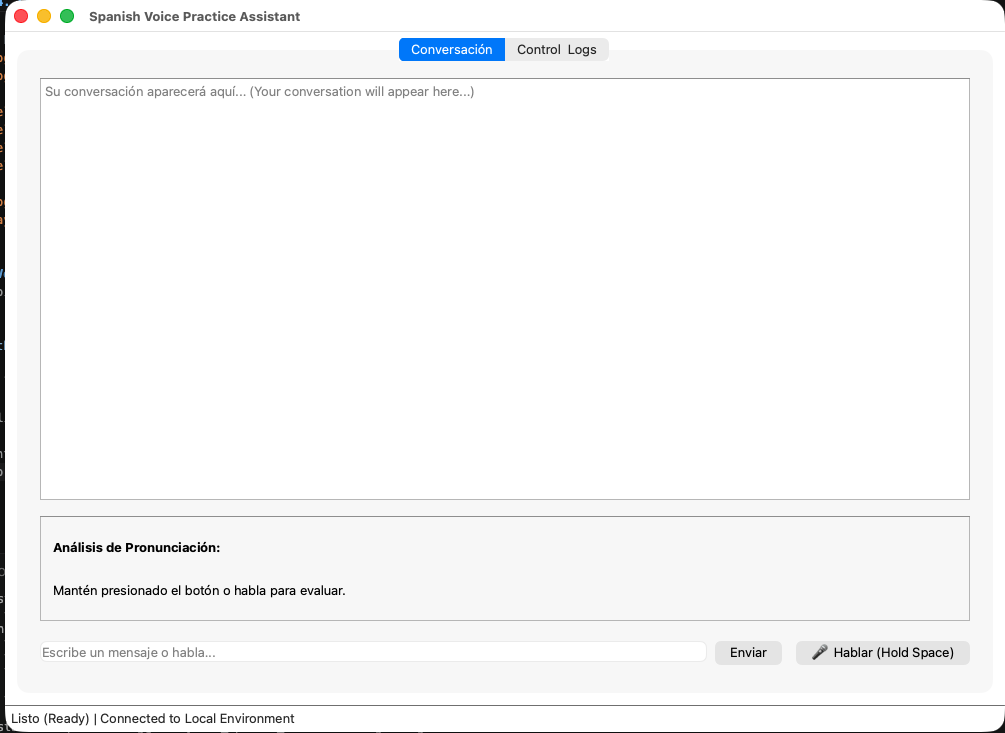
- [14.6. GUI First run](#146-gui-first-run)
# 1. Executive Overview
The project is a 100% offline, privacy-first Spanish speech practice assistant running natively on an Apple MacBook Pro M3. It creates a low-latency conversational feedback loop where you speak in Spanish, receive a generated audio response from a local LLM, and get automated feedback comparing your spoken pronunciation against the expected text.
# 2. System Architecture & Data Flow
```zsh
┌────────────────┐ ┌─────────────────────┐ ┌──────────────────────┐
│ Mic Input │ ──> │ mlx-whisper (STT) │ ──> │ PySide6 GUI │
└────────────────┘ └─────────────────────┘ └──────────┬───────────┘
│
▼
┌────────────────┐ ┌─────────────────────┐ ┌──────────────────────┐
│ Mac Speakers │ <── │ Kokoro-82M (TTS) │ <── │ Gemma 4 (llama.cpp) │
└────────────────┘ └─────────────────────┘ └──────────┬───────────┘
│
▼
┌──────────────────────┐
│ Feedback & SQLite DB │
└──────────────────────┘
```
## 2.1. Input Stage:
Your speech is recorded through the MacBook Pro's built-in microphone array and transcribed to Spanish text using mlx-whisper.
## 2.2. Inference Stage:
Transcribed text (along with recent session history from SQLite) is sent via HTTP to a local llama.cpp server running Gemma 4.
## 2.3. Synthesis Stage:
Gemma’s response is passed to Kokoro-82M, generating high-quality Spanish speech audio offline.
## 2.4. Output & Evaluation Stage:
Audio plays directly through your MacBook speakers via sounddevice. Concurrently, a feedback engine compares your spoken text against target phrases to highlight pronunciation accuracy and tracks your progress in SQLite.
# 3. Key Tech Stack & Components
|Component|Selected Technology|Role & Key Features|
|---------|-------------------|-------------------|
|Package Management|uv|"Fast Python environment setup, dependency management, and script execution (uv run main.py)."|
|GUI Framework|PySide6|Multi-tab desktop application using QtAsyncio to keep network and audio processes non-blocking.|
|LLM Server|Gemma 4 via llama.cpp|Local LLM inference server hosted on localhost:8080 with Metal GPU acceleration.|
|Speech-to-Text (STT)|mlx-whisper|"Apple Silicon-optimized Whisper engine utilizing the MLX framework for fast, accurate Spanish transcription."|
|Text-to-Speech (TTS)|Kokoro-82M|"Open-weight (Apache 2.0)| 82M parameter offline TTS engine generating 24kHz Spanish audio."|
|Feedback Engine,feedback_engine.py|"Calculates word error rates (WER), sequence similarity, and mispronounced/dropped words."|
|Data Storage|SQLite3|"Local relational database storing chat sessions| transcripts, system logs, and pronunciation scores."|
|Dev Environment|VS Code + Forgejo|Managed locally with self-hosted Git on Forgejo.|
# 4. User Interface Layout (PySide6)
The GUI consists of two main tabs:
* Tab 1: Conversación (Live Chat & Practice)
* Displays the streaming conversation transcript between you and the Assistant.
* Shows visual feedback cards after each spoken turn (e.g., Pronunciation Accuracy Score %, highlighted missing words, and accent notes).
* Tab 2: Control & Logs
* Displays system status (llama.cpp server state, latency metrics).
* Includes an embedded SQLite table viewer to inspect past conversation history and track language progress over time.
# 5. Core Advantages of This Design
* Zero Cloud Dependencies: Completely offline—no API costs, no network latency, and total privacy for your audio data.
* Hardware Optimized: Leverages your M3 Mac's Unified Memory, Metal GPU, and Neural Engine for sub-second pipeline processing.
* Clean Open-Source Licensing: Replaces proprietary components (like edge-tts) with permissive open-weight/open-source alternatives (Apache 2.0 / LGPL / MIT).
```zsh
+-------------------------------------------------------------------------------------------------------+
| SPANISH VOICE PRACTICE AI [PySide6] [ _ ] [ X ] |
+-------------------------------------------------------------------------------------------------------+
| [ CONVERSACIÓN (Practice) ] [ CONTROL & LOGS (Settings) ] |
+-------------------------------------------------------------------------------------------------------+
| |
| [TAB 1: CONVERSACIÓN] |
| |
| +-------------------------------------------------------------------------------------------------+ |
| | [CHAT DISPLAY - QTextEdit (Read-Only)] | |
| | | |
| | [User (Whisper)]: Hola Gemma, ¿cómo puedo mejorar mi acento español? | |
| | | |
| | [Assistant (Kokoro)]: ¡Hola! La mejor forma de mejorar es practicar en voz alta todos los días. | |
| | Intenta imitar mi entonación. | |
| | | |
| | [User (Whisper)]: ¿Puedes darme una frase para practica? | |
| | | |
| +-------------------------------------------------------------------------------------------------+ |
| |
| +-------------------------------------------------------------------------------------------------+ |
| | [FEEDBACK PANEL - QFrame (Visible after speaking)] | |
| | | |
| | Pronunciation Score: [ 88% ] [|||||||||| ] (Good) | |
| | -------------------------------------------------- | |
| | Target Text: "¿Puedes darme una frase para practicar?" | |
| | Spoken Text: "¿Puedes darme una frase para practica_?" | |
| | -------------------------------------------------- | |
| | [i] Notes: Watch your word endings (verb infinitives like 'practicar'). | |
| +-------------------------------------------------------------------------------------------------+ |
| |
| +-------------------------------------------------------------------------------------------------+ |
| | [INPUT AREA] | |
| | | |
| | [ HOLD SPACE TO SPEAK / Type your prompt... ] [ RECORD (O) ] [ SEND (->) ] | |
| | | |
| +-------------------------------------------------------------------------------------------------+ |
| |
+-------------------------------------------------------------------------------------------------------+
| System Status: Assistant Speaking... [DB Session: 104] |
+-------------------------------------------------------------------------------------------------------+
```
# 6. Layout Explanation
1. Main Window Structure
* Frameless/Standard QMainWindow: A clean modern window titled "Spanish Voice Practice AI."
* QTabWidget: The core navigation anchor.
* Tab 1 (Conversación): The main interaction zone shown above.
* Tab 2 (Control & Logs): (Not pictured) Would contain database viewing, LLM parameter sliders (temperature, max tokens), and system performance logs (latency checks).
2. Chat Display (QTextEdit)
* Displays a scrolling log of the conversation.
* Uses rich text formatting to differentiate between User, Assistant, and any system alerts.
* Transcripts from mlx-whisper are inserted here automatically.
3. Feedback Panel (QFrame)
* This panel appears (or updates) dynamically after the user finishes speaking and Whisper transcribes the audio.
* It displays the results generated by the PronunciationFeedbackEngine:
* Visual Score Bar: A colored bar/meter showing accuracy.
* Diff View: Uses HTML color coding (e.g., Red for omissions, Green for correct words) to visually compare Gemma's target text against the actual spoken transcription.
4. Input Area (QHBoxLayout)
* Combined Input: Primarily focused on voice, but includes a text fallback.
* Voice Trigger: A prominent visual button (RECORD (O)) and a keyboard shortcut (e.g., holding Spacebar) to initiate recording via the STTEngine.
* Send Button: A classic arrow icon for sending text input or manually submitting a recorded chunk.
5. Status Bar (QStatusBar)
* Provides real-time feedback on what the background systems are doing (e.g., "Whisper Transcribing...", "Gemma Generating...", "Kokoro Speaking...", "Ready").
* Displays the current active SQLite database session ID.
# 7. Code Structure
1. GUI Framework Alignment: You’ve migrated this project to PySide6 (as noted in your comment), but double-check that your UI imports and sub-classes across main.py, main_window.py, chat_tab.py, and control_tab.py are strictly using PySide6.QtWidgets rather than PyQt6.
2. Local macOS Optimization Opportunities: Since you are running locally on Apple Silicon (M3), using standard cloud/hybrid pipelines (edge-tts) or baseline CPU bindings might introduce unnecessary network latency or underutilize your Unified Memory.
## Tree Structure
```zsh
spanish-assistant/
├── pyproject.toml # UV dependency management (PySide6, mlx-whisper, etc.)
├── app/
│ ├── __init__.py
│ ├── main.py # PySide6 App entrypoint (QApplication)
│ ├── db.py # SQLite3 Context Manager & Repository pattern
│ ├── modules/
│ │ ├── llm_controller.py # Subprocess / HTTP client for local llama.cpp server
│ │ ├── stt_engine.py # Speech-to-Text (mlx-whisper / PyAudio capture)
│ │ └── tts_engine.py # Text-to-Speech (Local Kokoro-TTS or edge-tts fallback)
│ └── ui/
│ ├── main_window.py # Main PySide6 QMainWindow / QTabWidget
│ ├── chat_tab.py # Tab 1: Interactive Spanish audio/text interface
│ └── control_tab.py # Tab 2: Logs, DB Inspector, and local LLM parameter controls
└── data/
└── conversation_history.db # Local SQLite database storage
```
# 8. Key Technical Recommendations for app/modules/
1. Speech-to-Text (stt_engine.py)
* Apple Silicon Edge: If you are currently using standard openai-whisper or whisper.cpp Python bindings, consider using mlx-whisper. It leverages Apple's MLX framework to run Whisper directly on the M3 Neural Engine/GPU with significantly lower latency and minimal CPU impact.
2. Text-to-Speech (tts_engine.py)
* Offline Native TTS: edge-tts is simple and fast, but it requires an active internet connection to stream Microsoft's cloud endpoints.
* If you want a 100% offline local setup for Spanish voice practice, look into Kokoro-82M (e.g., via kokoro or kokoro-onnx). It supports high-quality, natural Spanish pronunciation locally on macOS without needing cloud requests.
3. Database Layer (db.py)
* Make sure your db.py exposes thread-safe connection handling (or a repository pattern) so background Qt threads (QThread) handling STT/TTS don't crash SQLite when logging conversations while the UI is rendering tables.
```Plaitext
spanish-assistant/
├── pyproject.toml # Managed with UV (PySide6, mlx-whisper, kokoro, sounddevice, etc.)
├── app/
│ ├── __init__.py
│ ├── main.py # Launches Spanish Assistant (QApplication + QtAsyncio)
│ ├── db.py # SQLite3 conversation history & progress tracker
│ ├── modules/
│ │ ├── llm_controller.py # Background process manager for llama.cpp (Gemma 4)
│ │ ├── stt_engine.py # Speech-to-Text via mlx-whisper
│ │ ├── tts_engine.py # Local 100% offline Spanish TTS via Kokoro-82M
│ │ └── feedback_engine.py # Pronunciation & WER accuracy comparison module
│ └── ui/
│ ├── main_window.py # Main QMainWindow shell
│ ├── chat_tab.py # Tab 1: Live conversation & real-time feedback card
│ └── control_tab.py # Tab 2: System logs, DB inspector, and LLM controls
└── data/
└── conversation_history.db # Session logs & speech analytics storage
```
```zsh
141_Spanish_Assistant % tree
├── app
│ ├── __init__.py
│ ├── main.py
│ ├── modules
│ │ ├── feedback_engine.py
│ │ ├── llm_controller.py
│ │ ├── stt_engine.py
│ │ └── tts_engine.py
│ └── ui
│ ├── chat_tab.py
│ ├── control_tab.py
│ └── main_window.py
├── data
└── doc
├── images
└── notes.md
```
# 9. Structure Review & Observations
* Python Packages: You have app/__init__.py, which turns app into a package. If you plan to import modules within chat_tab.py using absolute imports like from app.modules.llm_controller import LLMController, ensure you run your entry point (main.py) from the repository root (e.g., python -m app.main). Alternatively, consider adding an empty __init__.py inside app/modules and app/ui if you run into any relative import issues down the road.
* Data Directory: Keeping data/ at the root is ideal for local database storage (like SQLite/PostgreSQL dumps), audio cache files, or user session states.
* Docs & Assets: Placing screenshots or UI reference mockups in doc/images/ and markdown notes in doc/notes.md keeps the repository root tidy.
# 10. Recommended .gitignore
```zsh
# ==========================================
# macOS System Files
# ==========================================
.DS_Store
.AppleDouble
.LSOverride
Icon?
._*
# ==========================================
# Python & Bytecode
# ==========================================
__pycache__/
*.py[cod]
*$py.class
*.so
.Python
# ==========================================
# Virtual Environments
# ==========================================
.venv/
venv/
ENV/
env/
env.bak/
venv.bak/
# ==========================================
# Application Data & Cache
# ==========================================
# Keep the data/ directory structure, but ignore dynamic files inside it
data/*
!data/.gitkeep
# Local log files and audio caches
*.log
*.wav
*.mp3
*.ogg
# ==========================================
# Environment & Secrets
# ==========================================
.env
.env.local
*.pem
# ==========================================
# IDEs & Editors
# ==========================================
.vscode/
.idea/
*.swp
*.swo
```
# 11. Tree Commands
To tell tree to display hidden files, pass the -a (all) flag:
```zsh
tree -a
```
## 11.1. Excluding noisy hidden folders
If you run tree -a, it will also crawl into the .git directory, which prints a massive, messy wall of internal Git objects.
To see your .gitkeep and .gitignore without cluttering the output with .git/, use the -I (ignore) flag:
```zsh
tree -a -I '.git'
```
```zsh
.
├── .gitignore
├── app
│ ├── __init__.py
│ ├── main.py
│ ├── modules
│ │ ├── feedback_engine.py
│ │ ├── llm_controller.py
│ │ ├── stt_engine.py
│ │ └── tts_engine.py
│ └── ui
│ ├── chat_tab.py
│ ├── control_tab.py
│ └── main_window.py
├── data
│ └── .gitkeep
└── doc
├── images
└── notes.md
```
```zsh
stephenlohning@Scotty 141_Spanish_Assistant % tree -a
.
├── .git
│ ├── HEAD
│ ├── config
│ ├── description
│ ├── hooks
│ │ ├── applypatch-msg.sample
│ │ ├── commit-msg.sample
│ │ ├── fsmonitor-watchman.sample
│ │ ├── post-update.sample
│ │ ├── pre-applypatch.sample
│ │ ├── pre-commit.sample
│ │ ├── pre-merge-commit.sample
│ │ ├── pre-push.sample
│ │ ├── pre-rebase.sample
│ │ ├── pre-receive.sample
│ │ ├── prepare-commit-msg.sample
│ │ ├── push-to-checkout.sample
│ │ ├── sendemail-validate.sample
│ │ └── update.sample
│ ├── info
│ │ └── exclude
│ ├── objects
│ │ ├── info
│ │ └── pack
│ └── refs
│ ├── heads
│ └── tags
├── app
│ ├── __init__.py
│ ├── main.py
│ ├── modules
│ │ ├── feedback_engine.py
│ │ ├── llm_controller.py
│ │ ├── stt_engine.py
│ │ └── tts_engine.py
│ └── ui
│ ├── chat_tab.py
│ ├── control_tab.py
│ └── main_window.py
├── data
│ └── .gitkeeper
└── doc
├── images
└── notes.md
16 directories, 29 files
stephenlohning@Scotty 141_Spanish_Assistant %
```
## 11.2. Setting up Git
* Setting __push.followTags = true__ changes default behavior so that whenever you run git push, Git automatically pushes annotated tags that point to commits reachable from the branch you are pushing.
## 11.3. Step-by-Step Commands
Run these commands in order in your terminal:
```zsh
# 1. Stage all your initial project files and .gitignore
git add .
# 2. Make your first commit (this resolves HEAD and creates your branch)
git commit -m "Initial project structure and config"
# 3. Ensure your active branch is named 'main'
git branch -M main
# 4. Now create your annotated tag on the new commit
git tag -a v0.1.0 -m "Initial project structure and config"
# 5. Push your branch and tag up to Forgejo
git push -u origin main
```
After running git commit, git branch will display * main, and your git tag command will succeed!
# 12. Can you help me write the pyproject.toml file for uv including PySide6, mlx-whisper, and Kokoro?
Here is a complete, production-ready pyproject.toml file tailored specifically for 141_Spanish_Assistant using uv.
It includes:
* PySide6 for the GUI.
* mlx-whisper for Apple Silicon GPU/Neural Engine accelerated speech-to-text.
* kokoro-onnx (and soundfile) for fast, local, 100% offline Kokoro-82M TTS.
* sounddevice and numpy for real-time audio capture and playback.
* requests to communicate with your local llama.cpp server hosting Gemma 4.
* editdistance / jiwer for pronunciation accuracy and Word Error Rate (WER) evaluations in feedback_engine.py.pyproject.toml
*
Create or overwrite pyproject.toml in the root of 141_Spanish_Assistant:
```zsh
[project]
name = "spanish-assistant"
version = "0.1.0"
description = "Local, offline Spanish speech practice assistant running on Apple Silicon"
readme = "README.md"
requires-python = ">=3.10,<3.13"
authors = [
{ name = "Stephen", email = "stephen.lohning@oxnee.com" }
]
dependencies = [
# GUI Framework
"pyside6>=6.6.0",
# Local Speech-to-Text (Apple MLX Engine)
"mlx-whisper>=0.2.0",
# Local Text-to-Speech (Kokoro 82M via ONNX Runtime)
"kokoro-onnx>=0.5.0",
"soundfile>=0.12.1",
# Audio Recording & Playback
"sounddevice>=0.4.6",
"numpy>=1.24.0,<2.0.0",
# HTTP Client for local llama.cpp server
"requests>=2.31.0",
# Pronunciation Feedback & Text Analytics
"editdistance>=0.8.0",
"jiwer>=3.0.0",
]
[build-system]
requires = ["hatchling"]
build-backend = "hatchling.build"
[tool.uv]
# Ensures dependencies stay isolated and locked cleanly on macOS
dev-dependencies = [
"pytest>=8.0.0",
"black>=24.0.0",
]
```
# 13. How to Initialize & Install using uv
Run these commands in your terminal from the root directory:
```zsh
# 1. Create a Python 3.12 virtual environment managed by uv
uv venv --python 3.12
# 2. Sync and install all dependencies defined in pyproject.toml
uv sync
# 3. Test that the environment loads cleanly
uv run python -c "import PySide6, mlx_whisper, kokoro_onnx; print('All core modules imported successfully!')"
```
### 13.0.1. Note on Python Version:
* requires-python is set to <3.13 because several core MLX and ONNX bindings used on Apple Silicon run most reliably on Python 3.10–3.12.
```zsh
stephenlohning@Scotty 141_Spanish_Assistant % uv venv --python 3.12
warning: The `tool.uv.dev-dependencies` field (used in `pyproject.toml`) is deprecated and will be removed in a future release; use `dependency-groups.dev` instead
Using CPython 3.12.12 interpreter at: /opt/homebrew/opt/python@3.12/bin/python3.12
Creating virtual environment at: .venv
Activate with: source .venv/bin/activate
stephenlohning@Scotty 141_Spanish_Assistant % uv sync
warning: The `tool.uv.dev-dependencies` field (used in `pyproject.toml`) is deprecated and will be removed in a future release; use `dependency-groups.dev` instead
× No solution found when resolving dependencies:
╰─▶ Because only kokoro-onnx<=0.5.0 is available and kokoro-onnx==0.5.0 depends on numpy>=2.0.2, we can conclude that kokoro-onnx>=0.5.0 depends on numpy>=2.0.2.
And because your project depends on kokoro-onnx>=0.5.0 and numpy>=1.24.0,<2.0.0, we can conclude that your project's requirements are unsatisfiable.
stephenlohning@Scotty 141_Spanish_Assistant % source .venv/bin/activate
(141_Spanish_Assistant) stephenlohning@Scotty 141_Spanish_Assistant %
```
## 13.1. Errors and Fixes
```zsh
I got the following comments
stephenlohning@Scotty 141_Spanish_Assistant % uv venv --python 3.12
warning: The `tool.uv.dev-dependencies` field (used in `pyproject.toml`) is deprecated and will be removed in a future release; use `dependency-groups.dev` instead
Using CPython 3.12.12 interpreter at: /opt/homebrew/opt/python@3.12/bin/python3.12
Creating virtual environment at: .venv
Activate with: source .venv/bin/activate
stephenlohning@Scotty 141_Spanish_Assistant % uv sync
warning: The `tool.uv.dev-dependencies` field (used in `pyproject.toml`) is deprecated and will be removed in a future release; use `dependency-groups.dev` instead
× No solution found when resolving dependencies:
╰─▶ Because only kokoro-onnx<=0.5.0 is available and kokoro-onnx==0.5.0 depends on numpy>=2.0.2, we can conclude that kokoro-onnx>=0.5.0 depends on numpy>=2.0.2.
And because your project depends on kokoro-onnx>=0.5.0 and numpy>=1.24.0,<2.0.0, we can conclude that your project's requirements are unsatisfiable.
stephenlohning@Scotty 141_Spanish_Assistant % source .venv/bin/activate
(141_Spanish_Assistant) stephenlohning@Scotty 141_Spanish_Assistant % uv run python -c "import PySide6, mlx_whisper, kokoro_onnx; print('All core modules imported successfully!')"
warning: The `tool.uv.dev-dependencies` field (used in `pyproject.toml`) is deprecated and will be removed in a future release; use `dependency-groups.dev` instead
× No solution found when resolving dependencies:
╰─▶ Because only kokoro-onnx<=0.5.0 is available and kokoro-onnx==0.5.0 depends on numpy>=2.0.2, we can conclude that kokoro-onnx>=0.5.0 depends on numpy>=2.0.2.
And because your project depends on kokoro-onnx>=0.5.0 and numpy>=1.24.0,<2.0.0, we can conclude that your project's requirements are unsatisfiable.
(141_Spanish_Assistant) stephenlohning@Scotty 141_Spanish_Assistant %
```
This is a dependency conflict between kokoro-onnx and numpy, combined with an updated syntax rule in modern uv.
Here is why it failed and how to fix it:
1. numpy Conflict: kokoro-onnx>=0.5.0 explicitly requires numpy>=2.0.2. The pyproject.toml constrained numpy to <2.0.0, creating an impossible set of rules for uv to resolve.
2. uv Deprecation Warning: In recent uv versions, dev dependencies belong under [dependency-groups] rather than [tool.uv.dev-dependencies].
The Fixed pyproject.toml
Replace your root pyproject.toml with this updated version:
```zsh
[project]
name = "spanish-assistant"
version = "0.1.0"
description = "Local, offline Spanish speech practice assistant running on Apple Silicon"
readme = "README.md"
requires-python = ">=3.10,<3.13"
authors = [
{ name = "Stephen", email = "stephen.lohning@oxnee.com" }
]
dependencies = [
# GUI Framework
"pyside6>=6.6.0",
# Local Speech-to-Text (Apple MLX Engine)
"mlx-whisper>=0.2.0",
# Local Text-to-Speech (Kokoro 82M via ONNX Runtime)
"kokoro-onnx>=0.5.0",
"soundfile>=0.12.1",
# Audio Recording & Playback (Compatible with NumPy 2.x)
"sounddevice>=0.4.6",
"numpy>=2.0.2",
# HTTP Client for local llama.cpp server
"requests>=2.31.0",
# Pronunciation Feedback & Text Analytics
"editdistance>=0.8.0",
"jiwer>=3.0.0",
]
[build-system]
requires = ["hatchling"]
build-backend = "hatchling.build"
# Updated syntax for dev dependencies in modern uv
[dependency-groups]
dev = [
"pytest>=8.0.0",
"black>=24.0.0",
]
```
### 13.1.1. Step-by-Step Resolution Commands
Run these steps in your terminal to clear out the old resolution state and sync cleanly:
```zsh
# 1. Sync dependencies with the updated pyproject.toml
uv sync
# 2. Test the core module imports
uv run python -c "import PySide6, mlx_whisper, kokoro_onnx; print('All core modules imported successfully!')"
```
Once uv sync finishes, you will see All core modules imported successfully! and your .venv will be ready for development.
### 13.1.2. I got the following errors uv sync
```zsh
stephenlohning@Scotty 141_Spanish_Assistant % uv sync
warning: The `tool.uv.dev-dependencies` field (used in `pyproject.toml`) is deprecated and will be removed in a future release; use `dependency-groups.dev` instead
× No solution found when resolving dependencies:
╰─▶ Because only kokoro-onnx<=0.5.0 is available and kokoro-onnx==0.5.0 depends on numpy>=2.0.2, we can conclude that kokoro-onnx>=0.5.0 depends on numpy>=2.0.2.
And because your project depends on kokoro-onnx>=0.5.0 and numpy>=1.24.0,<2.0.0, we can conclude that your project's requirements are unsatisfiable.
stephenlohning@Scotty 141_Spanish_Assistant % source .venv/bin/activate
(141_Spanish_Assistant) stephenlohning@Scotty 141_Spanish_Assistant % uv run python -c "import PySide6, mlx_whisper, kokoro_onnx; print('All core modules imported successfully!')"
warning: The `tool.uv.dev-dependencies` field (used in `pyproject.toml`) is deprecated and will be removed in a future release; use `dependency-groups.dev` instead
× No solution found when resolving dependencies:
╰─▶ Because only kokoro-onnx<=0.5.0 is available and kokoro-onnx==0.5.0 depends on numpy>=2.0.2, we can conclude that kokoro-onnx>=0.5.0 depends on numpy>=2.0.2.
And because your project depends on kokoro-onnx>=0.5.0 and numpy>=1.24.0,<2.0.0, we can conclude that your project's requirements are unsatisfiable.
(141_Spanish_Assistant) stephenlohning@Scotty 141_Spanish_Assistant % uv sync
Resolved 109 packages in 1.52s
× Failed to build `spanish-assistant @ file:///Users/stephenlohning/Documents/01_Projects/141_Spanish_Assistant`
├─▶ The build backend returned an error
╰─▶ Call to `hatchling.build.build_editable` failed (exit status: 1)
[stderr]
Traceback (most recent call last):
File "", line 11, in
File "/Users/stephenlohning/.cache/uv/builds-v0/.tmpOvMudK/lib/python3.12/site-packages/hatchling/build.py", line 83, in build_editable
return os.path.basename(next(builder.build(directory=wheel_directory, versions=["editable"])))
^^^^^^^^^^^^^^^^^^^^^^^^^^^^^^^^^^^^^^^^^^^^^^^^^^^^^^^^^^^^^^^^^^^^^
File "/Users/stephenlohning/.cache/uv/builds-v0/.tmpOvMudK/lib/python3.12/site-packages/hatchling/builders/plugin/interface.py", line 92, in build
self.metadata.validate_fields()
File "/Users/stephenlohning/.cache/uv/builds-v0/.tmpOvMudK/lib/python3.12/site-packages/hatchling/metadata/core.py", line 266, in validate_fields
self.core.validate_fields()
File "/Users/stephenlohning/.cache/uv/builds-v0/.tmpOvMudK/lib/python3.12/site-packages/hatchling/metadata/core.py", line 1437, in validate_fields
getattr(self, attribute)
File "/Users/stephenlohning/.cache/uv/builds-v0/.tmpOvMudK/lib/python3.12/site-packages/hatchling/metadata/core.py", line 533, in readme
raise OSError(message)
OSError: Readme file does not exist: README.md
hint: Build failures usually indicate a problem with the package or the build environment%
(141_Spanish_Assistant) stephenlohning@Scotty 141_Spanish_Assistant %
```
There were two independent issues happening in your terminal output:
Resolution Failure (Fixed): The first run failed because of the numpy constraint conflict.
Build Failure (README.md Missing): The second run succeeded in resolving all 109 packages, but failed at the build step because pyproject.toml declared readme = "README.md", but no README.md file existed in your project root yet.
Additionally, because your Python code lives inside an app/ folder rather than a src/ or spanish_assistant/ package folder, Hatchling (the build backend) needs a small configuration hint to know what to include in editable mode (uv sync).
Step 1: Create a placeholder README.md
Run this in your terminal from the project root:
``zsh
touch README.md
echo "# 141 Spanish Assistant" > README.md
```
Step 2: Use the Updated pyproject.tomlUpdate your root pyproject.toml with this version. It configures [tool.hatch.build.targets.wheel] so Hatchling cleanly packages the app/ directory without throwing editable build errors:
```zsh
[project]
name = "spanish-assistant"
version = "0.1.0"
description = "Local, offline Spanish speech practice assistant running on Apple Silicon"
readme = "README.md"
requires-python = ">=3.10,<3.13"
authors = [
{ name = "Stephen", email = "stephen.lohning@oxnee.com" }
]
dependencies = [
# GUI Framework
"pyside6>=6.6.0",
# Local Speech-to-Text (Apple MLX Engine)
"mlx-whisper>=0.2.0",
# Local Text-to-Speech (Kokoro 82M via ONNX Runtime)
"kokoro-onnx>=0.5.0",
"soundfile>=0.12.1",
# Audio Recording & Playback
"sounddevice>=0.4.6",
"numpy>=2.0.2",
# HTTP Client for local llama.cpp server
"requests>=2.31.0",
# Pronunciation Feedback & Text Analytics
"editdistance>=0.8.0",
"jiwer>=3.0.0",
]
[build-system]
requires = ["hatchling"]
build-backend = "hatchling.build"
# Configures Hatchling to recognise the app/ directory
[tool.hatch.build.targets.wheel]
packages = ["app"]
[dependency-groups]
dev = [
"pytest>=8.0.0",
"black>=24.0.0",
]
```
Step 3: Run uv sync and Test
Now sync and verify:
```zsh
uv sync
```
```zsh
uv run python -c "import PySide6, mlx_whisper, kokoro_onnx; print('All core modules imported successfully!')"
```
You should see All core modules imported successfully!, with zero warnings or errors. Which we did
git tag -a v0.1.1 -m "uv set all modules loaded "
# 14. Create basic PySide6 boilerplate for main.py, main_window.py, and the tab modules
Here is a complete set of boilerplate code tailored specifically for 141_Spanish_Assistant.
It uses PySide6.QtAsyncio for non-blocking execution (allowing STT, TTS, and LLM calls to run seamlessly in the background without freezing the GUI).
## 14.1. Entry Point: app/main.py
This file initializes the PySide6 application, creates the MainWindow, and delegates execution to QtAsyncio.
```zsh
# app/main.py
import sys
import PySide6.QtAsyncio as QtAsyncio
from PySide6.QtWidgets import QApplication
from app.ui.main_window import MainWindow
def main():
app = QApplication(sys.argv)
app.setApplicationName("Spanish Assistant")
window = MainWindow()
window.show()
# QtAsyncio handles the combined Qt and Python asyncio event loop
QtAsyncio.run()
if __name__ == "__main__":
main()
```
## 14.2. Main Window: app/ui/main_window.py
Sets up the primary container with a QTabWidget hosting Tab 1 (Conversación) and Tab 2 (Control & Database).
```zsh
# app/ui/main_window.py
from PySide6.QtCore import Qt
from PySide6.QtWidgets import QMainWindow, QStatusBar, QTabWidget, QVBoxLayout, QWidget
from app.ui.chat_tab import ChatTab
from app.ui.control_tab import ControlTab
class MainWindow(QMainWindow):
def __init__(self):
super().__init__()
self.setWindowTitle("Spanish Voice Practice Assistant")
self.resize(1000, 700)
# Main Layout Setup
central_widget = QWidget(self)
self.setCentralWidget(central_widget)
main_layout = QVBoxLayout(central_widget)
# Tab Widget Initialization
self.tabs = QTabWidget(self)
self.chat_tab = ChatTab(self)
self.control_tab = ControlTab(self)
self.tabs.addTab(self.chat_tab, "Conversación")
self.tabs.addTab(self.control_tab, "Control & Logs")
main_layout.addWidget(self.tabs)
# Status Bar Setup
self.status_bar = QStatusBar(self)
self.setStatusBar(self.status_bar)
self.status_bar.showMessage("Listo (Ready) | Connected to Local Environment")
```
## 14.3. Chat Tab: app/ui/chat_tab.py
Contains the conversation log, feedback display panel, and voice/text user input triggers.
```zsh
#app/ui/chat_tab.py
import asyncio
from PySide6.QtCore import Qt
from PySide6.QtWidgets import (
QFrame,
QHBoxLayout,
QLabel,
QLineEdit,
QPushButton,
QTextEdit,
QVBoxLayout,
QWidget,
)
class ChatTab(QWidget):
def __init__(self, parent=None):
super().__init__(parent)
self._init_ui()
def _init_ui(self):
layout = QVBoxLayout(self)
# 1. Chat History Display
self.chat_display = QTextEdit(self)
self.chat_display.setReadOnly(True)
self.chat_display.setPlaceholderText(
"Su conversación aparecerá aquí... (Your conversation will appear here...)"
)
layout.addWidget(self.chat_display, stretch=4)
# 2. Feedback Panel (Pronunciation & WER Metrics)
self.feedback_panel = QFrame(self)
self.feedback_panel.setFrameShape(QFrame.Shape.StyledPanel)
feedback_layout = QVBoxLayout(self.feedback_panel)
self.feedback_label = QLabel("Análisis de Pronunciación:", self)
self.feedback_content = QLabel("Mantén presionado el botón o habla para evaluar.", self)
feedback_layout.addWidget(self.feedback_label)
feedback_layout.addWidget(self.feedback_content)
layout.addWidget(self.feedback_panel, stretch=1)
# 3. User Input Controls
input_layout = QHBoxLayout()
self.text_input = QLineEdit(self)
self.text_input.setPlaceholderText("Escribe un mensaje o habla...")
self.text_input.returnPressed.connect(self._on_send)
self.btn_send = QPushButton("Enviar", self)
self.btn_send.clicked.connect(self._on_send)
self.btn_record = QPushButton("🎤 Hablar (Hold Space)", self)
self.btn_record.clicked.connect(self._on_record_clicked)
input_layout.addWidget(self.text_input, stretch=3)
input_layout.addWidget(self.btn_send)
input_layout.addWidget(self.btn_record)
layout.addLayout(input_layout)
def _on_send(self):
text = self.text_input.text().strip()
if text:
self.chat_display.append(f"Tú: {text}")
self.text_input.clear()
# Schedule asynchronous processing via asyncio
asyncio.create_task(self._simulate_assistant_response(text))
def _on_record_clicked(self):
self.chat_display.append("[Escuchando audio local vía mlx-whisper...]")
async def _simulate_assistant_response(self, user_text: str):
# Async coroutine demonstrating QtAsyncio responsiveness
await asyncio.sleep(1.0)
response = f"¡Hola! Recibí tu mensaje: '{user_text}'. ¿Cómo te va?"
self.chat_display.append(f"Asistente: {response}")
```
## 14.4. Control Tab: app/ui/control_tab.py
Dedicated to system logs, llama.cpp server configuration, and local SQLite data inspection.
```zsh
# app/ui/control_tab.py
from PySide6.QtWidgets import (
QGroupBox,
QHBoxLayout,
QLabel,
QPushButton,
QTextEdit,
QVBoxLayout,
QWidget,
)
class ControlTab(QWidget):
def __init__(self, parent=None):
super().__init__(parent)
self._init_ui()
def _init_ui(self):
layout = QVBoxLayout(self)
# Server Control Group
server_group = QGroupBox("Estado del Servidor LLM Local (llama.cpp / Gemma 4)", self)
server_layout = QHBoxLayout(server_group)
self.status_label = QLabel("Estado: Detenido (Stopped)", self)
self.btn_toggle_server = QPushButton("Iniciar Servidor", self)
server_layout.addWidget(self.status_label)
server_layout.addWidget(self.btn_toggle_server)
layout.addWidget(server_group)
# Log Output Viewer
log_group = QGroupBox("Registros del Sistema (System Logs)", self)
log_layout = QVBoxLayout(log_group)
self.log_viewer = QTextEdit(self)
self.log_viewer.setReadOnly(True)
self.log_viewer.append("[SYSTEM] Entorno PySide6 inicializado correctamente.")
self.log_viewer.append("[SYSTEM] Esperando conexión con base de datos SQLite...")
log_layout.addWidget(self.log_viewer)
layout.addWidget(log_group)
```
## 14.5. Verification
Run the boilerplate using uv:
```zsh
uv run python -m app.main
```
This will launch a GUI window featuring tabbed navigation, text interaction, and async-ready buttons.
If you'd like to get a sense of how asynchronous Qt event loops handle UI reactivity without freezing, this tutorial provides a great hands-on walkthrough.
Async event loop integration with Qt
This video demonstrates how to run an infinite or asynchronous task inside a Qt application without locking up the user interface.
## 14.6. GUI First run