
6.5 KiB
1. Project Structure
The following is the desire structure
web-calibre/
├── src/
│   ├── app/                # All Routes (Pages & APIs)
│   │   ├── api/            # API ROUTES
│   │   │   ├── auth/       # NextAuth routes [...nextauth]
│   │   │   └── upload/     # Custom API for OneDrive sessions
│   │   ├── dashboard/      # Protected user area
│   │   ├── layout.tsx      # Global Layout
│   │   └── page.tsx        # Landing Page
│   ├── components/         # MUI Components (FileTable, Navbar)
│   ├── lib/                # Config (Prisma, Theme, Auth)
│   │   ├── prisma.ts
│   │   └── theme.ts        <-- MUI Theme Defined Here
│   └── middleware.ts       <-- Protected Routes Logic
├── prisma/                 # DB Schema
└── .env                    # Secrets
2. App Registrations
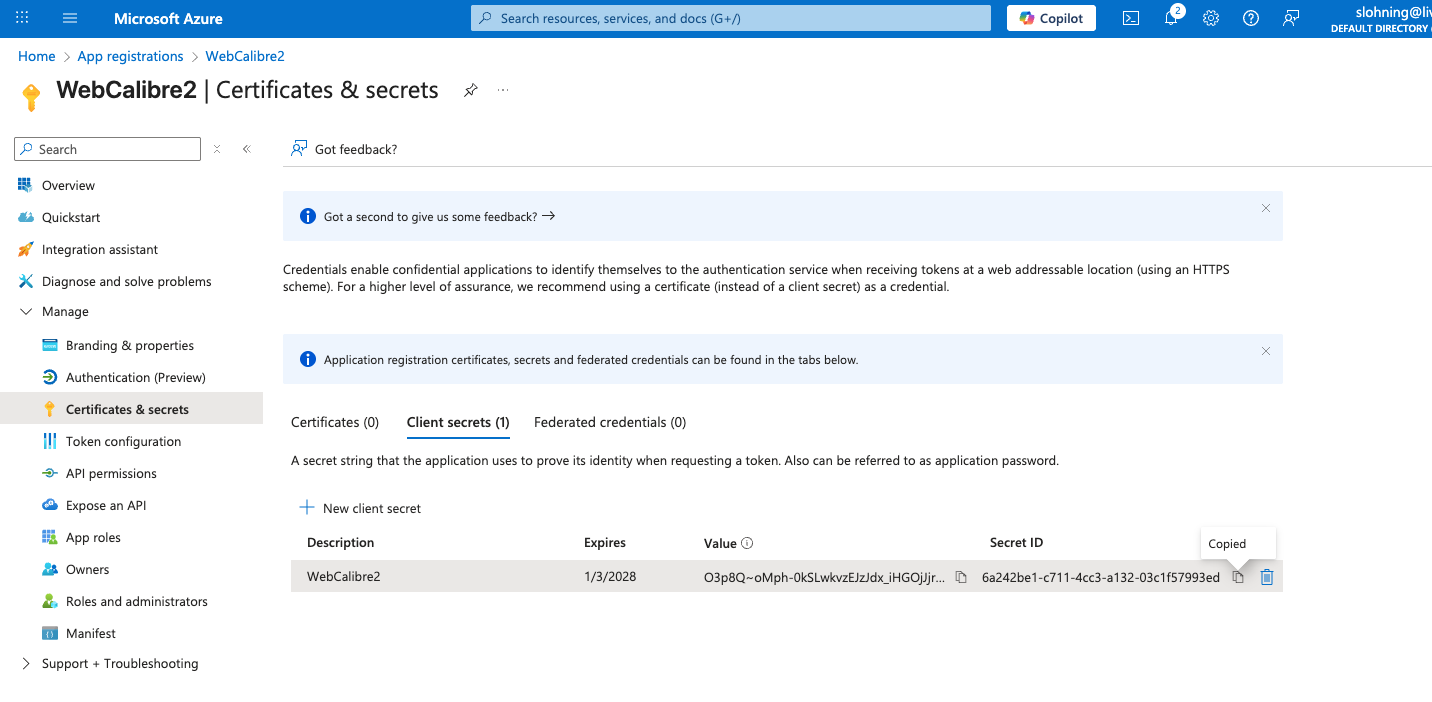
Application (client) ID = 'b549931a-f491-436b-b7bc-d37d8ca3c17e'
Object ID ='0b8256a2-e2ac-472b-896a-4b5845bc32fe'
Directory (tenant) ID = '1c06ce7c-7884-4796-8652-d4c32d75a5d0'
Expires = 1/3/2028
Value='O3p8Q~oMph-0kSLwkvzEJzJdx_iHGOjJjrr5Pa1A'
Secret ID='6a242be1-c711-4cc3-a132-03c1f57993ed'
Since you are using NextAuth.js, the URL must follow a very specific pattern.
For local development: http://localhost:3000/api/auth/callback/azure-ad
For production: https://your-domain.com/api/auth/callback/azure-ad
Note: Replace azure-ad with whatever ID you give the provider in your code. By default, in NextAuth, it is usually azure-ad.
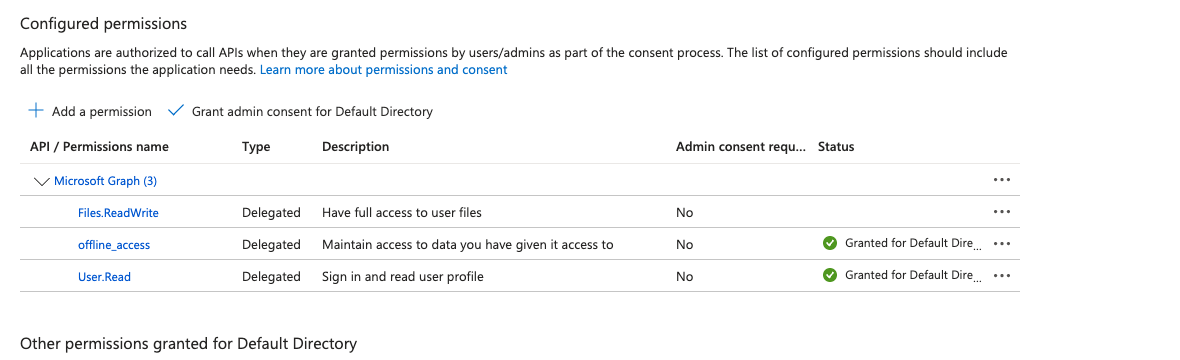
2.1. Permissions Needed
3. Steps
3.1. create nextjs app
The following command creates the nextjs folder structure
Yes, Next.js has a specific syntax to create a project in your current directory instead of creating a new subfolder.
To do this, navigate to your empty project folder in the terminal and run:
npx create-next-app@latest .
Important Details:
-
The Dot (.): This tells the installer to use the current directory as the project root.
-
Naming Conflict: If the folder name contains capital letters (e.g., WebCalibre), the command will fail with an error. Next.js requires the root folder name to be all lowercase and URL-friendly. You must rename your folder to web-calibre before running the command. This caused me rename to all lower case.
3.Empty Folder: The directory must be empty (except for hidden files like .git). If you already have files in there, the installer will stop to prevent overwriting your work.
What happens next? Even though you are using the current directory, the interactive prompt will still ask you:
"What is your project named?" You can just hit Enter to accept the current folder name.
Configuration: It will then ask you about TypeScript, ESLint, Tailwind CSS, the src/ directory, and the App Router.
Based on our previous discussions, I recommend selecting "Yes" for TypeScript, ESLint, Tailwind, the src/ directory, and the App Router to match the professional structure we planned for WebCalibre.
3.2. Create .env file
In Next.js, the distinction between .env and .env.local is primarily about security and overriding defaults. While both store key-value pairs, they are handled differently by Git and the Next.js runtime.
- Security & Version Control (Git)The most important reason is that .env.local is automatically ignored by Git in standard Next.js projects.
- .env: Intended for "safe" default values that you want to share with your entire team. It is committed to your repository so that every developer has the same baseline configuration.
- .env.local: Intended for secrets (API keys, database passwords, Azure secrets). Because it is not committed to Git, your private credentials never end up on GitHub or in your production code history.
- Priority & Overriding Next.js uses a "hierarchy" of loading.1 If you define the same variable in both files, .env.local wins. This allows you to set a generic placeholder in .env for the team, but use your specific local developer settings on your own machine. For example:
- In .env: DATABASE_URL=postgres://localhost:5432/mydb (The team's default)
- In .env.local: DATABASE_URL=postgres://admin:password123@localhost:5432/my_private_dev_db (Your personal setup)
The Next.js Loading Order Next.js looks for variables in this specific order (from highest priority to lowest):
- process.env (System environment variables)
- .env.development.local (Only during npm run dev)
- .env.local (Available in all environments except test)
- .env.development
- .env (The final fallback)
Summary Comparison Table
| Feature | .env | .env.local |
|---|---|---|
| Purpose | Shared defaults/constants | Private secrets & local overrides |
| Committed to Git? | Yes | No (Added to .gitignore) |
| Sensitive Data? | NEVER | YES (API Keys, Secrets) |
| Scope | All developers/environments | Just your machine |
**Best Practice Tip: ** Since .env.local isn't shared on GitHub, it’s a good idea to create a file named .env.example in your project. This file should contain the names of the keys (e.g., AZURE_AD_CLIENT_SECRET=) but leave the values blank, so other developers know which variables they need to create on their own machines.
3.3. Configure Git
Nextjs initializes git by default. But is doesn't add some configs that I do
git config --global push.followTags true
git remote add origin "/Users/stephenlohning/Library/CloudStorage/OneDrive-Personal/Documents/10_GIT_Repositories/124_WebCalibre2.git"
git remote -v origin /Users/stephenlohning/Library/CloudStorage/OneDrive-Personal/Documents/10_GIT_Repositories/124_WebCalibre2.git (fetch) origin /Users/stephenlohning/Library/CloudStorage/OneDrive-Personal/Documents/10_GIT_Repositories/124_WebCalibre2.git (push)
3.4. Test nextjs
npm run dev

> 124_webcalibre2@0.1.0 dev
> next dev

▲ Next.js 16.1.1 (Turbopack)
- Local:         http://localhost:3000
- Network:       http://192.168.1.100:3000
- Environments: .env

✓ Starting...
✓ Ready in 648ms
If it working proceed